Migration Overview
Migration Guide
User migration from an existing identity system is a key phase of any integration process. This guide covers the full lifecycle of migration, providing detailed insights from initial planning to successful execution.
Migration overview
User migration entails moving user accounts, credentials, and related data from your legacy system to the new platform. This process ensures that users can continue accessing your services seamlessly, without any disruption.
Migration scenarios
In general there are two main tracks that can be followed during migration.
-
The simpler one is when the old legacy database migrated is being switched off immediately after migration. The newly migrated NevisID database becomes the sole one in use. This can easily be achieved by a one step one-time-bulk migration procedure
-
On the more complex route, the legacy database is not immediately switched off. Different scenarios exist in this case, in terms of which database is the primary (the legacy or the new NevisID based), and how this role changes over time. The continuous inbound and outbound procedures support these.
Important to note what the primary database term means. This specifies the database where all user updates, additions and deletions happen. And all of these changes are synced through one of the continuous procedures to the other, secondary database. On the secondary database changes are only done by this sync procedure, but no other procedure changes data on it. Syncing can always only happen in one direction at a time, either inbound for NevisID or outbound of it. They can follow each other after a cutoff to the other database to be the primary, but cannot run in parallel in the same time period. But it is not supported out of the box due to data consistency complexities to configure a setup where both the legacy and the new NevisID databases are updated at the same time, and data is synced across them in both directions in parallel.
-
One typical flow is when the data is migrated, the new NevisID database becomes the primary, and changes are synced back to the old legacy database over some time period before being switched off. This is achievable by configuring a one-time-bulk migration followed by a continuous outbound migration process.
-
Based on this example, with the mentioned building blocks, more complex flows are also available. Even such where, for example, first the old legacy database stays as the primary, then a cutoff is made for the new NevisID database to be the master. And in the end the old legacy database is switched off after a period of time.
-
It is also possible to configure, for example, a double downstream integration. For example where user data is primarily updated in a legacy HR database. This is synced to NevisID (inbound sync). And changes that happen this way in NevisID are synced further (outbound sync) to Active Directory.
Migration procedures
Choose the migration approach that best fits your requirements
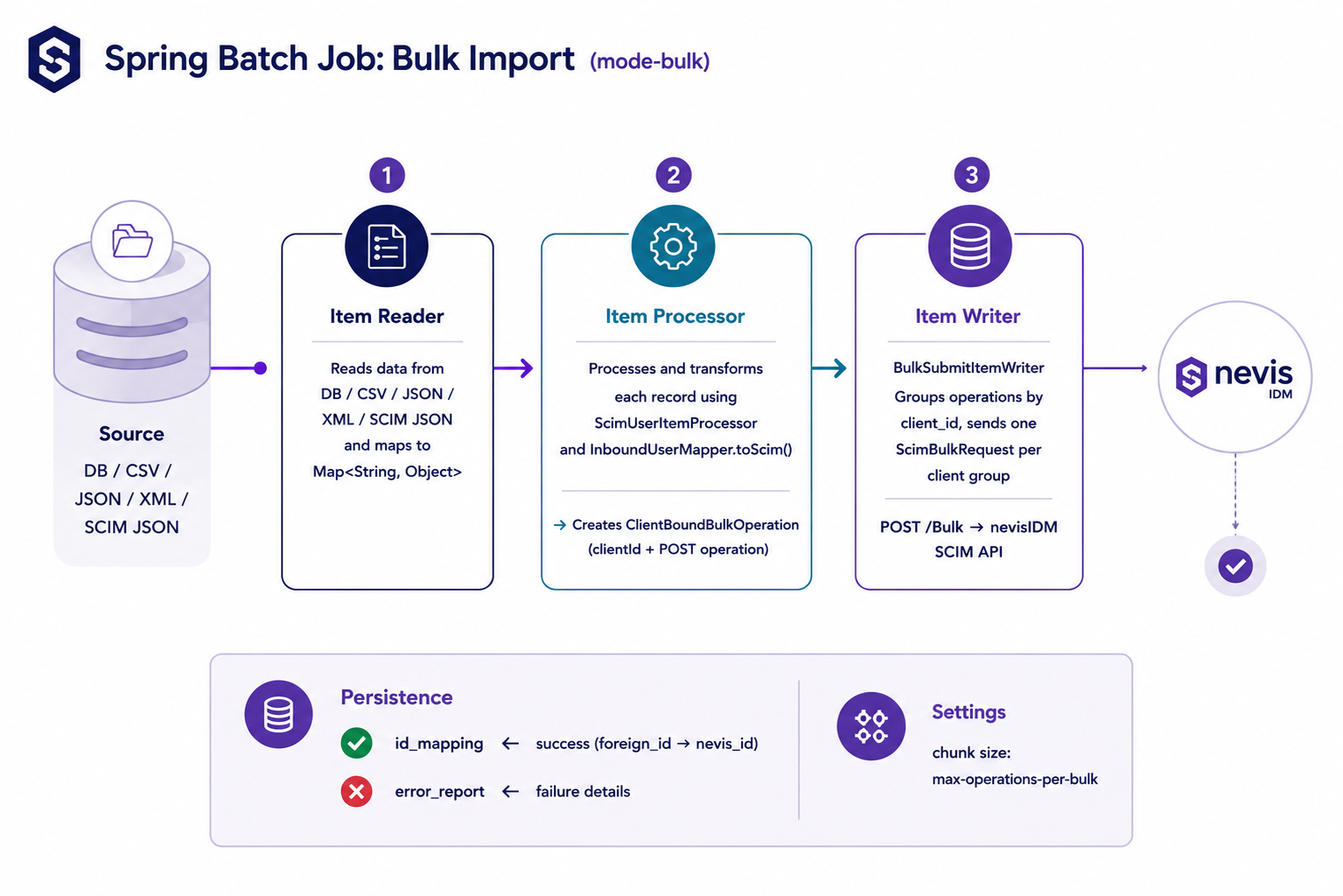
- One-time-bulk migration
- Transfer all users from the legacy system in a single operation.
- In this case the target database becomes the sole primary data source.
- Use this approach when you intend to migrate all users in a single operation and subsequently decommission the legacy system.
-
Continuous inbound migration
-
Continuously synchronize the data from the source legacy system to the target NevisID database. The migration starts with a one-time-bulk full load of the database, which can be repeated anytime to establish synchronicity, in line with the SCIM migration standards.
-
In this approach, the source system initially serves as the primary data source. All legacy processes can be run the same way as before, but NevisID is also updated and hence can take care of additional new functions. Old legacy processes can be migrated to NevisID gradually.
-
Later, this role can be transitioned to the target platform upon the expiry of the defined cutoff time.
-
This approach is ideal for:
-
Gradual migration scenarios
-
Situations where both systems must run in parallel, but user updates are better still to be handled on the legacy side
-
-
Use this method when migration of processes needs to be carried out over an extended period while maintaining both systems in operation.
-
-
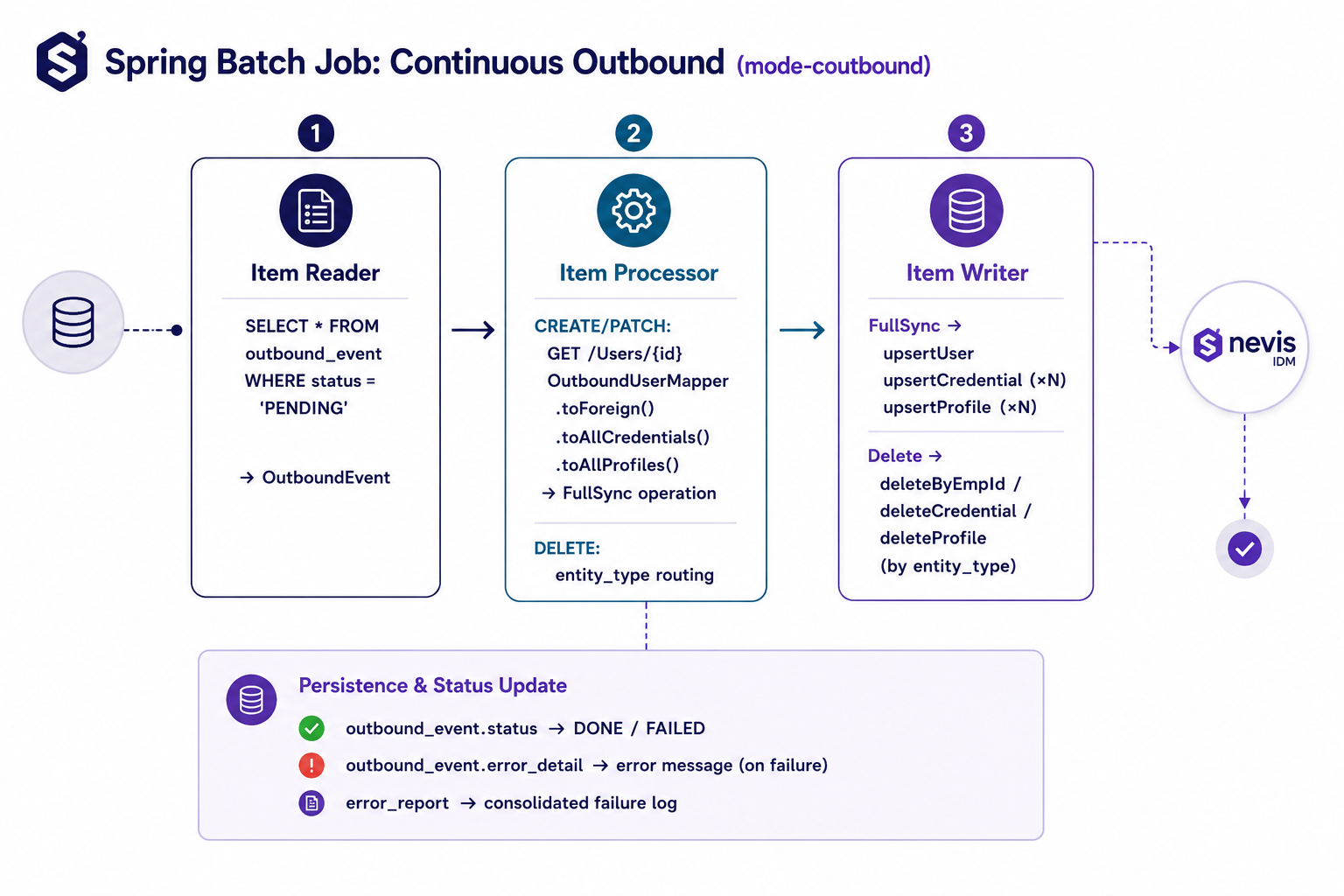
Continuous outbound migration
-
Continuously synchronize the data from NevisID to the the original legacy system database. The migration starts with a one-time-bulk full load of the database from the legacy system to NevisID. Or this process step can be used after the cutoff time of the continuous inbound migration process.
-
In this case NevisID becomes the primary data source. You can update and edit the data in the primary data source and then sync back to the source system. A one-time-bulk full load of the database from NevisID to the legacy system can be repeated anytime to establish synchronicity, in line with the SCIM migration standards.
-
This approach is particularly suitable for:
-
Environments where multiple systems must remain aligned
-
Useful for organizations that cannot fully retire legacy systems immediately and need a controlled, phased migration strategy with ongoing synchronization.
-
Suitable for companies that want to establish NevisID as the primary data source, while still maintaining synchronization with a legacy system during the transition phase.
-
Use this approach when most processes from the legacy side were migrated to NevisID, but some still need to be maintained on the legacy side.
-
-
Quick Start Checklist
Follow this checklist to guide your migration process:
- Complete migration planning
- Plan a communication strategy for affected users
- Review the structure of your current user data (roles, units, profiles, policies, settings)
- Map source data fields to the NevisID SCIM schema
- Select the appropriate migration procedure
- Set up authentication for the migration API (e.g., Client Credentials flow)
- Develop a credential migration strategy, if applicable
- Execute the migration
- Verify the accuracy and completeness of migrated user data
- Communicate to the users
Next steps
- Plan your migration
- Assess existing user data
- Create new user structure in NevisID
- Configure your field mappings
- Customize your continuous migration apps
- Execute migration