Removing Patterns
Removing a Single Pattern
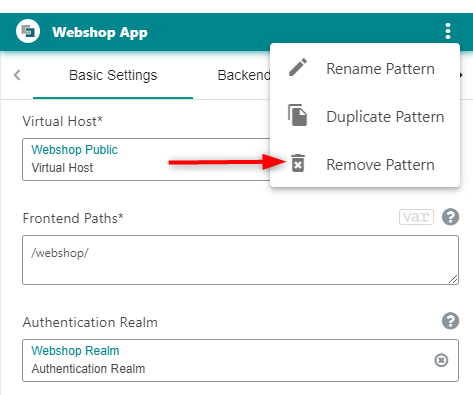
A pattern that was added by mistake or became obsolete can be removed. Perform these steps to do so:
- Click on the
 in the top right corner of the Pattern Editor, to open the overflow menu.
 - Click Remove pattern in the overflow menu.
info
Patterns can be removed even if they are referenced by another pattern (for more information about pattern references, see Pattern reference.
warning
Removing instance patterns
When you remove an instance pattern, the instance will not be removed on the deployment hosts. Removal on the deployment host must be done manually.
Example for manual removal
To completely remove a nevisAuth instance, execute the following commands on the target host:
systemctl stop nevisauth@<name>
systemctl disable nevisauth@<name>
nevisauth inst remove <name>
<name>: The sanitized pattern name. Sanitized means that spaces and other special characters are replaced by underscore.
Removing Multiple Patterns
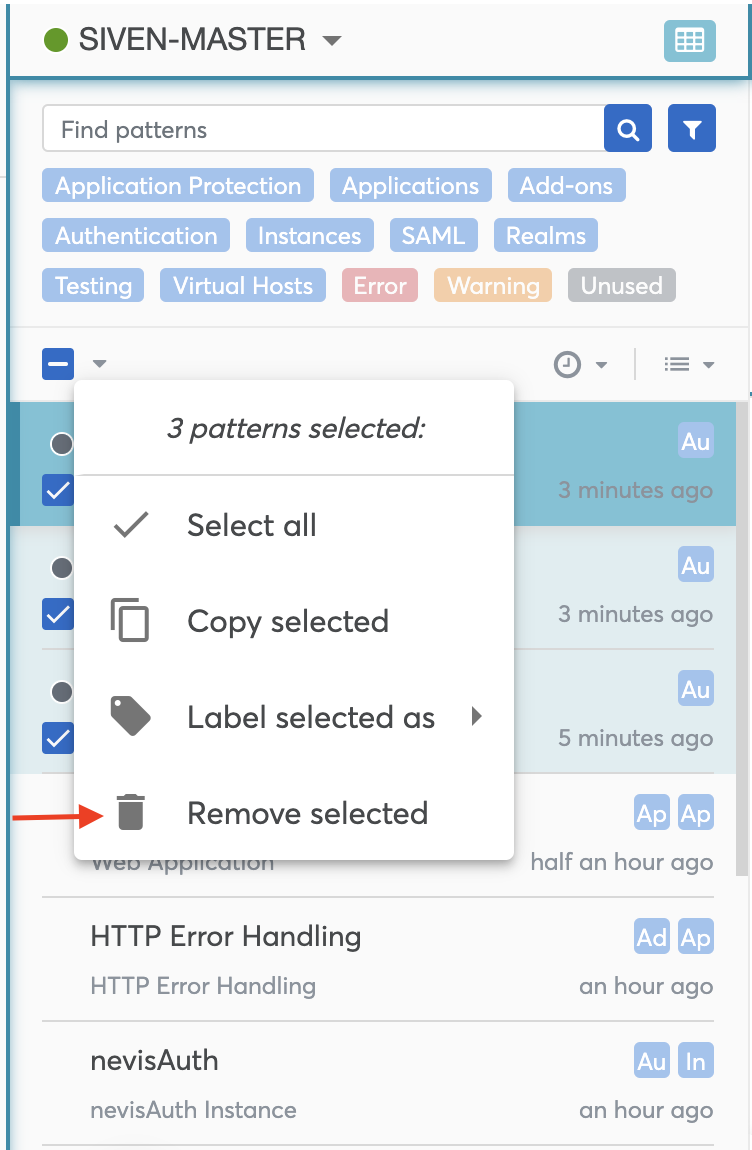
Removing multiple patterns at once can be done via batch actions. Perform the following steps to remove patterns in batch:
- Select multiple patterns.
- Click on the batch actions menu.
- Click Remove selected action.
- Confirm the warning message.