Registration with nevisAuth
In this use-case, the FIDO2 Registration is implemented with ScriptStates in nevisAuth. For a generic description and prerequisites, please see Registration.
The presented example solution simplifies nevisAuth configuration by hiding most of the logic in the Groovy ScriptState including the HTTP API calls to nevisFIDO.
The Nevis Identity Suite provides a nevisAdmin 4 pattern named FIDO2 Management Demo that contains a FIDO2 / WebAuthn capable client JavaScript. Use it or build upon it, but note that it is a demo/testing pattern only, not intended for production use, and we might change or remove it in the future.
Technical Flow
The initial authentication depends on the custom integration as well as the existing means of authentication the end user possesses. Thus, the initial authentication steps are not explained in detail but only referenced.
The following flow is a simple compact example. Depending on requirements, changes or different approaches might be required. The key fix points are:
- WebAuthn API in the browser.
- FIDO2 HTTP API in nevisFIDO.
- nevisAuth must be aware of the status of the FIDO2 registration.
-
The user initiates the FIDO2 registration.
-
The ScriptState returns a GuiDescriptor configuring the nevisLogRend template to include the JS client.
-
The JS client submits an empty form POST to get the
ServerPublicKeyCredentialCreationOptionsResponse. In this example implementation theServerPublicKeyCredentialCreationOptionsRequestis generated by the Groovy ScriptSate. -
The
ServerPublicKeyCredentialCreationOptionsRequestis created byScriptStateand calls the nevisFIDO Options endpoint.Endpoint:
https://<nevisFIDO-host>:<nevisFIDO-port>/nevisfido/fido2/attestation/optionsReference: nevisFIDO Reference Guide
-
nevisFIDO queries the FIDO2 credentials from nevisIdm.
-
Challenge is generated and the
ServerPublicKeyCredentialCreationOptionsResponseis built. -
A direct response is prepared using the
ServerPublicKeyCredentialCreationOptionsResponse. -
JS client receives the
ServerPublicKeyCredentialCreationOptionsResponse. -
JS client initiates a registration using the received Options response via the WebAuthn API.
-
Dialog presented to the user by the browser to confirm the credential creation.
-
The user approves the credential creation.
-
The WebAuthn API generates the keys and returns an attestation to the JS client.
-
JS client submits attestation to the backend.
-
The
ScriptStatein nevisAuth assembles aServerPublicKeyCredentialForRegistrationJSON payload from the form submit and calls the nevisFIDO REST API.Endpoint:
https://<nevisFIDO-host>:<nevisFIDO-port>/nevisfido/fido2/attestation/resultReference: nevisFIDO Reference Guide
-
nevisFIDO session lookup. (This session is independent of the nevisAuth session)
-
Incoming request validated according to the WebAuthn specification.
-
nevisFIDO stores the FIDO2 credential in nevisIDM, such that it is related to the username.
-
FIDO2 session is updated to reflect the current status.
-
ServerResponse is returned stating the status of the FIDO2 authentication. At this point the FIDO2 registration is completed.
-
ScriptStatetransitions took.
Integration
Overview
The following diagram illustrates the integrated flow, as well as the main points of configuration.
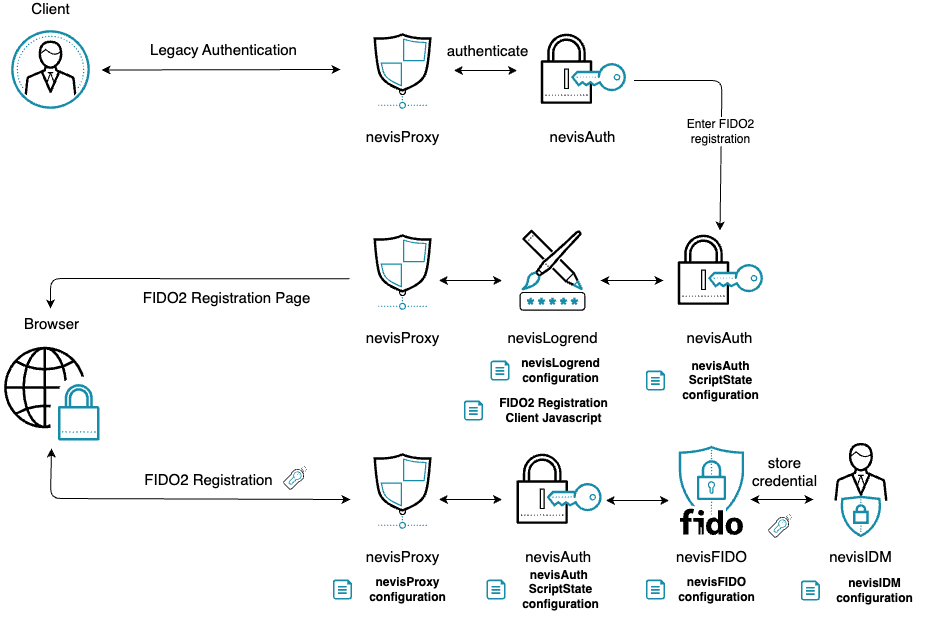
General Considerations
- A legacy authentication should preceed FIDO2 Registration, which ensures the user is authenticated before it can create new credentials. This means the following AuthStates should be created as part of a
stepupauthentication flow in nevisAuth. - The ScriptState assumes that an
IdmGetPropertiesStateAuthState is executed in the flow before, which maps the userId received from the browser to an extId. - Everytime you copy and create a file, make sure it is readable by
nvauser, and is thus accessible by Nevis components.
Disclaimer
The guide assumes the Nevis components nevisProxy, nevisAuth, nevisLogrend, nevisFIDO and nevisIDM are already installed and setup in some configuration, i.e. that the environment already supports use-cases independent of FIDO2.
Integrate FIDO2 Registration with nevisAuth
-
Copy & paste the groovy script into your nevisAuth instance folder.
FIDO2 Registration ScriptState
/var/opt/nevisauth/<instance>/conf/fido2_registration.groovyimport ch.nevis.esauth.util.httpclient.api.Httpimport ch.nevis.esauth.util.httpclient.api.HttpClientsimport groovy.json.JsonOutputimport groovy.json.JsonSlurper// the button name must be different from 'cancel'if (inargs.containsKey('cancel-bottom')) {inargs.remove('cancel-bottom') // prevent follow-up cancel in subsequent stepsresponse.setResult('cancel')return}if (inargs.containsKey('failed')) {response.setResult('failed')return}def getUserFriendlyName(String userAgent) {if (userAgent == null) {return null}def sb = new StringBuilder()// Check for browserdef browser = nullif (userAgent.contains('Chrome')) {browser = 'Chrome'}else if (userAgent.contains('Firefox')) {browser = 'Firefox'}else if (userAgent.contains('Safari')) {browser = 'Safari'}else {browser = 'Unknown browser'}// Check for operating systemdef os = nullif (userAgent.contains('Windows')) {os = 'Windows'}else if (userAgent.contains('Linux')) {os = 'Linux'}else if (userAgent.contains('iOS')) {os = 'iOS'}// Build the stringif (browser != null) {sb.append(browser)}if (os != null) {if (sb.length() > 0) {sb.append(' on ')}sb.append(os)}return sb.toString()}def getPath() {if (inargs.containsKey('path')) { // form POSTreturn inargs['path']}if (inargs.containsKey('o.path.v')) { // AJAX POSTreturn inargs['o.path.v']}return null}def post(requestBuilder, json) {def body = json.toString()LOG.info("==> Request: ${body}")def entity = Http.entity().content(body).build()def fidoRequest = requestBuilder.entity(entity).build()def httpClient = HttpClients.create()return fidoRequest.send(httpClient)}def path = getPath()if (path == null) {// POST from JavaScript not receivedreturn // the AuthEngine will trigger default and thus the GUI will be rendered}String usernameVal = session['ch.nevis.idm.User.extId'] ?: session['ch.adnovum.nevisidm.user.extId'] ?: session['ch.adnovum.nevisidm.userExtId'] ?: request.userId ?: notes['userid']Objects.requireNonNull(usernameVal, "Unable to determine username. Check your authentication flow.")String displayNameVal = session['ch.nevis.idm.User.email'] ?: session['ch.nevis.session.loginid'] ?: session['ch.nevis.idm.User.loginId'] ?: request.getLoginId()Objects.requireNonNull(displayNameVal, "Unable to determine displayName. Check your authentication flow.")def baseUrl = "https://" + parameters.get('fido')def requestBuilder = Http.post().url(baseUrl + path).header('Accept', 'application/json').header('Content-Type', 'application/json;charset=utf-8')if (path == '/nevisfido/fido2/attestation/options') {def data = [:]data.username = usernameValdata.displayName = displayNameValdata.authenticatorSelection = [:]def attachment = parameters.get('authenticatorAttachment')if (attachment) {if (attachment in ['platform', 'cross-platform']) {data.authenticatorSelection.authenticatorAttachment = attachment} else {LOG.warn("Invalid authenticatorAttachment value: ${attachment}")}}data.authenticatorSelection.requireResidentKey = parameters.get('requireResidentKey')data.authenticatorSelection.residentKey = parameters.get('residentKey')data.authenticatorSelection.userVerification = parameters.get('userVerification') ?: 'preferred'data.attestation = parameters.get('attestation') ?: 'none'def json = JsonOutput.toJson(data)def fidoResponse = post(requestBuilder, json)def responseCode = fidoResponse.code()def responseText = fidoResponse.bodyAsString()LOG.info("<== Response: ${responseCode} : ${responseText}")response.setContent(responseText) // return response from nevisFIDO "as-is"response.setContentType('application/json')response.setHttpStatusCode(200)response.setIsDirectResponse(true)return}def userAgent = request.getHttpHeader('User-Agent')Objects.requireNonNull(userAgent, "Missing User-Agent header.")def userFriendlyName = getUserFriendlyName(userAgent)Objects.requireNonNull(userFriendlyName, "Unable to determine userFriendlyName. Check User-Agent header.")if (path == '/nevisfido/fido2/attestation/result') {def data = [:]data.id = inargs['id']data.type = inargs['type']data.response = [:]data.response.clientDataJSON = inargs['response.clientDataJSON']data.response.attestationObject = inargs['response.attestationObject']data.userFriendlyName = userFriendlyNamedata.userAgent = userAgentdef json = JsonOutput.toJson(data)def fidoResponse = post(requestBuilder, json)def responseCode = fidoResponse.code()def responseText = fidoResponse.bodyAsString()LOG.info("<== Response: ${responseCode} : ${responseText}")if (responseCode == 200) {def status = new JsonSlurper().parseText(responseText).statusif (status == 'ok') {response.setResult('ok')return}}}response.setError(1, "FIDO2 onboarding failed")noteusernameValanddisplayNameValare resolved from the authentication session. The expressions above assume the user'sextIdhas already been loaded into the session (see the note in step 2); adjust them if your flow stores these identifiers under different session attributes. -
Create the ScriptState in the nevisAuth configuration:
FIDO2 Registration ScriptState configuration
/var/opt/nevisauth/<instance>/conf/esauth4.xml<AuthState name="Fido2Registration"class="ch.nevis.esauth.auth.states.scripting.ScriptState" final="false"><ResultCond name="ok" next="<next-state>"/><Response value="AUTH_CONTINUE"><Gui name="fido2_registration" label="title.login"/></Response><property name="parameter.fido" value="<fido_host:fido_port>"/><!-- Attach a SecToken to the authenticated call to nevisFIDO. Required when the options endpoint is SecToken-protected, as recommended. --><property name="parameter.httpclient.authorization.basic.sectoken.userId" value="${sess:ch.nevis.idm.User.extId}"/><property name="parameter.httpclient.authorization.basic.sectoken.profileId" value="${sess:ch.adnovum.nevisidm.profileId}"/><property name="parameter.httpclient.authorization.basic.sectoken.roles" value="unused"/><property name="script" value="file:///var/opt/nevisauth/<instance>/conf/fido2_registration.groovy"/></AuthState>The GUI has an element named
fido2_registration, this will help nevisLogrend to realize the FIDO2 Client Javascript is to be served to the client side.noteThe
httpclient.authorization.basic.sectoken.*parameters make nevisAuth attach a SecToken to its call to nevisFIDO. This is required when the nevisFIDO options endpoint is protected with SecTokens (the recommended setup, see Default HTTP API endpoints). TheHttpClients.create()call in the script picks these parameters up automatically. SetuserIdto a session attribute resolving to the user's identifier (here theextIdloaded into the session),profileIdto the nevisIDM profile, androlesto a comma-separated list of roles used to generate the SecToken. The role value is not used for authorization here, so a single placeholder such asunusedis sufficient (at least one role is required).-
Substitute data from your environment into this configuration block, such as the
fido-hostandfido-portwhich together point to your nevisFIDO instance, and theinstancewhich is the name of the nevisAuth instance. -
Integrate this AuthState into your authentication flow by making another AuthState or Domain refer to it, then set the
next-state. If no further processing is required after FIDO2 Registration,next-stateshould point to anAuthDoneAuthState.
noteMake sure to choose a step-up authentication flow to integrate into, and make sure the
extIdof the user is already loaded into the session. This latter can be ensured with theIdmGetPropertiesStateAuthState for example. -
-
Copy the Javascript files into
/var/opt/nevislogrend/<instance>/data/applications/def/resourcesor into another application inside nevisLogrend.FIDO2 Client Javascript
/var/opt/nevislogrend/<instance>/data/applications/def/resources/fido2_registration.jsfunction dispatch(name) {// we have to do a top-level request instead of AJAXconst form = document.createElement("form");form.method = "POST";form.style.display = "none";addInput(form, name, "true");document.body.appendChild(form);form.submit();}async function attestation(options) {let credential;try {credential = await navigator.credentials.create({"publicKey": options});}// cancel and timeout can occur besides errorcatch (error) {console.error(`Failed to create WebAuthn credential: ${error}`);throw error;}// as this is the last call we have to do a top-level request instead of AJAXconst form = document.createElement("form");form.method = "POST";form.style.display = "none";addInput(form, "path", "/nevisfido/fido2/attestation/result")addInput(form, "id", credential.id);addInput(form, "type", credential.type);addInput(form, "response.clientDataJSON", base64url.encode(credential.response.clientDataJSON));addInput(form, "response.attestationObject", base64url.encode(credential.response.attestationObject));document.body.appendChild(form);form.submit();}function start() {if (!isWebAuthnSupportedByTheBrowser()) {dispatch("unsupported");return;};const request = {};request.path = "/nevisfido/fido2/attestation/options";// calling nevisFIDO through nevisAuth on current URL using AJAXfetch("", {method: "POST",headers: {'Content-Type': 'application/json'},body: JSON.stringify(request)}).then(res => res.json()).then(options => {options.user.id = base64url.decode(options.user.id);options.challenge = base64url.decode(options.challenge);if (options.excludeCredentials != null) {options.excludeCredentials = options.excludeCredentials.map((c) => {c.id = base64url.decode(c.id);return c;});}if (options.authenticatorSelection.authenticatorAttachment === null) {options.authenticatorSelection.authenticatorAttachment = undefined;}return attestation(options);}).catch((error) => {console.log('Error during FIDO2 onboarding: ' + error);dispatch("failed");});}FIDO2 utily
/var/opt/nevislogrend/<instance>/data/applications/def/resources/fido2_utils.jsfunction addInput(form, name, value) {const input = document.createElement("input");input.name = name;input.value = value;form.appendChild(input);}/*** Checks whether WebAuthn is supported by the browser or not.* @return true if supported, false if it is not supported or not in secure context*/function isWebAuthnSupportedByTheBrowser() {if (window.isSecureContext) {// This feature is available only in secure contexts in some or all supporting browsers.if ('credentials' in navigator) {return true;}console.warn('Oh no! This browser does not support WebAuthn.');return false;}console.warn('WebAuthn feature is available only in secure contexts. For testing over HTTP, you can use the origin "localhost".');return false;}Base64url encoding library
/var/opt/nevislogrend/<instance>/data/applications/def/resources/base64.js/** Base64URL-ArrayBuffer* https://github.com/herrjemand/Base64URL-ArrayBuffer** Copyright (c) 2017 Yuriy Ackermann <[email protected]>* Copyright (c) 2012 Niklas von Hertzen* Licensed under the MIT license.**/(function() {"use strict";var chars = "ABCDEFGHIJKLMNOPQRSTUVWXYZabcdefghijklmnopqrstuvwxyz0123456789-_";// Use a lookup table to find the index.var lookup = new Uint8Array(256);for (var i = 0; i < chars.length; i++) {lookup[chars.charCodeAt(i)] = i;}var encode = function(arraybuffer) {var bytes = new Uint8Array(arraybuffer),i, len = bytes.length, base64 = "";for (i = 0; i < len; i+=3) {base64 += chars[bytes[i] >> 2];base64 += chars[((bytes[i] & 3) << 4) | (bytes[i + 1] >> 4)];base64 += chars[((bytes[i + 1] & 15) << 2) | (bytes[i + 2] >> 6)];base64 += chars[bytes[i + 2] & 63];}if ((len % 3) === 2) {base64 = base64.substring(0, base64.length - 1);} else if (len % 3 === 1) {base64 = base64.substring(0, base64.length - 2);}return base64;};var decode = function(base64) {var bufferLength = base64.length * 0.75,len = base64.length, i, p = 0,encoded1, encoded2, encoded3, encoded4;var arraybuffer = new ArrayBuffer(bufferLength),bytes = new Uint8Array(arraybuffer);for (i = 0; i < len; i+=4) {encoded1 = lookup[base64.charCodeAt(i)];encoded2 = lookup[base64.charCodeAt(i+1)];encoded3 = lookup[base64.charCodeAt(i+2)];encoded4 = lookup[base64.charCodeAt(i+3)];bytes[p++] = (encoded1 << 2) | (encoded2 >> 4);bytes[p++] = ((encoded2 & 15) << 4) | (encoded3 >> 2);bytes[p++] = ((encoded3 & 3) << 6) | (encoded4 & 63);}return arraybuffer;};/*** Exporting and stuff*/if (typeof module !== 'undefined' && typeof module.exports !== 'undefined') {module.exports = {'encode': encode,'decode': decode}} else {if (typeof define === 'function' && define.amd) {define([], function() {return {'encode': encode,'decode': decode}});} else {window.base64url = {'encode': encode,'decode': decode}}}})(); -
Configure nevisLogrend
Edit one of the
.vmconfiguration files in your nevisLogrend instance. Prefer aheader.vmor a.vmfile dedicated for script imports.Import scripts into the HTML
/var/opt/nevislogrend/<instance>/data/applications/def/webdata/template/header.vm#if ($gui.name == "fido2_registration")<script src="<app-data-path>/resources/base64.js"></script><script src="<app-data-path>/resources/fido2_utils.js"></script><script src="<app-data-path>/resources/fido2_registration.js"></script>#end -
Configure nevisProxy.
The FIDO2 calls of the Javascript now must come through nevisAuth, as the ScriptState is designed to dispatch them to nevisFIDO. To make this happen, subsequent requests must reach the ScriptState.
Enable RecheckAuthentication for your IdentityCreationFilter
<init-param><param-name>RecheckAuthentication</param-name><param-value>On</param-value></init-param> -
Restart the instances, FIDO2 Registration should be operational!