System Overview
Your Nevis ID subscription gives you a dedicated Nevis ID instance. Each instance runs in a dedicated Azure Kubernetes Service (AKS) cluster.
The following base components are always deployed:
| Component | Role |
|---|---|
| nevisAdmin | Provides the Nevis ID management console for configuring the instance |
| Nevis Operator | Kubernetes controller that manages the lifecycle of deployed Nevis components |
| Deployment GIT | An internal Gitea instance used for deployment purposes |
| Azure Database for PostgreSQL | Managed relational database service used by several components |
The remainder of this page describes the infrastructure, components, and network topology of a Nevis ID instance. It provides background information and serves as technical reference for integrators.
Network Overview
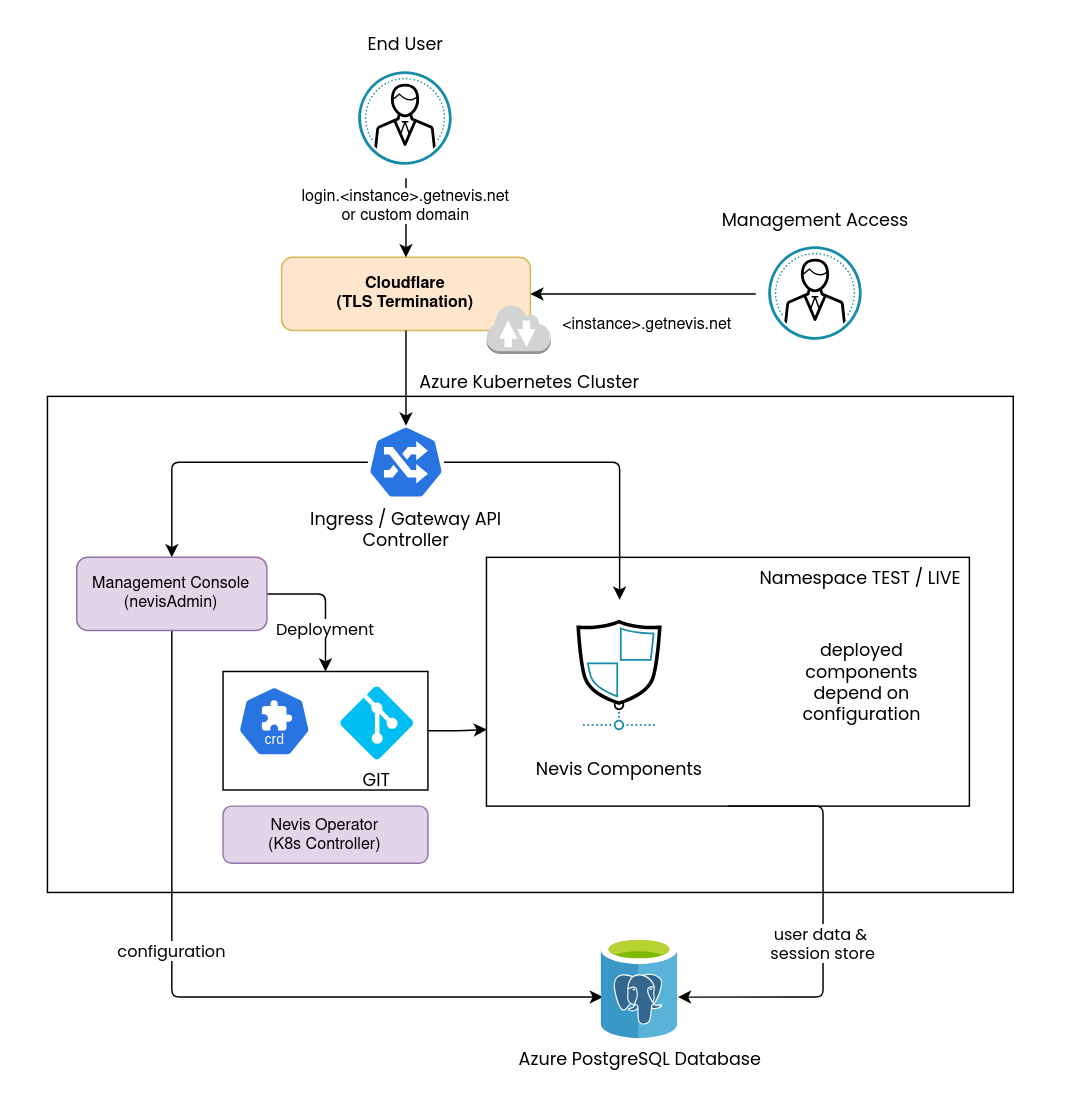
TLS Termination
All traffic entering a Nevis ID instance passes through Cloudflare, which handles TLS termination before forwarding requests to the cluster.
Kubernetes Ingress
Requests are routed into the AKS cluster through NGINX Ingress, which dispatches them to the appropriate component based on the requested host and path.
Nevis plans to replace NGINX Ingress with Gateway API (Envoy).
User Traffic
User-facing requests are forwarded by NGINX Ingress to nevisProxy, which acts as the central routing and policy enforcement point. Based on the request path, nevisProxy forwards requests to the downstream Nevis components such as nevisAuth, nevisMeta, nevisIDM, or nevisFIDO.
Authentication and registration processes are orchestrated by nevisAuth, involving other components as required.
Management Traffic
Access to the cluster for management purposes is exclusively through the Nevis ID management console — no direct Kubernetes API access is provided.
Requests targeting the management console are forwarded by NGINX Ingress to nevisAdmin, the component that hosts the management console frontend.
The management console also provides features that involve other Nevis components, which is not depicted in this diagram.
Environments
A Nevis ID instance typically includes two environments:
| Environment | Purpose | Domain pattern |
|---|---|---|
LIVE | Production | <subdomain>.<instance>.getnevis.net |
TEST | Configuration and validation | <subdomain>-test.<instance>.getnevis.net |
There are three different subdomains:
login: intended for end-user facing use cases (e.g. endpoints for OAuth / OpenID Connect).manage: management UIs of Nevis components.api: intended for exposing REST APIs of Nevis components.
Customers may divert from this default structure.
For instance, it is possible to bring your own domain for the end user facing login domain.
Contact Nevis for details.
Endpoints
The endpoints exposed by a Nevis ID instance depend on the deployed project configuration. Integrators may expose additional endpoints or omit defaults depending on their requirements.
For a reference of the endpoints available in a typical setup, see the Example Project User Guide.
Nevis Components
Integrators deploy Nevis components into the cluster through nevisAdmin. For a full list of available components and their documentation, see Nevis Components.
In most setups, the following Nevis components are used:
| Component | Role |
|---|---|
| nevisProxy | Reverse proxy; the entry point for all user-facing traffic |
| nevisAuth | Provides self-registration and authentication flow. Handles federation protocols. |
| nevisMeta | OAuth 2.0 / OpenID Connect configuration |
| nevisIDM | Identity and user data management |
| nevisLogrend | Login renderer (UI engine for login pages) |
| nevisFIDO | FIDO UAF and FIDO2 / passkey server |