REST Interface
The REST interface is designed to serve the following purposes:
- Provide an OpenID Connect UserInfo Endpoint in nevisIDM.
- Allow user search with quick, full-text search queries.
- Expose all nevisIDM entities, like users, profiles, credentials through REST API.
When using REST APIs some information is transferred in the URL, for example in case of a call to the Query REST Service: /nevisidm/api/query/v1/users?q=loginid:jim. Depending on jurisdiction and industry sector regulations, this transferred information could be treated as sensitive data which requires additional protection. If this is the case, ensure the logs are properly protected or scrubbed of sensitive data.
nevisIDM Core REST API Introduction
The nevisIDM Core REST API enables you to query and manipulate the managed identity objects in nevisIDM using CRUD operations. CRUD stands for creating, reading, updating, and deleting resources.
Relationships between two resources are defined by their external IDs. The only way to (re)define the relationship between two resources is through the nevisIDM REST API. That is, by object creation with POST calls, by assignment through PUT calls, and by unassignment through DELETE calls.
The nevisIDM REST API also provides access to the properties of the different objects. Properties are dynamic parameters that contain additional, customer-specific information about an object.
Managed identity objects
The identity objects of nevisIDM look like this:
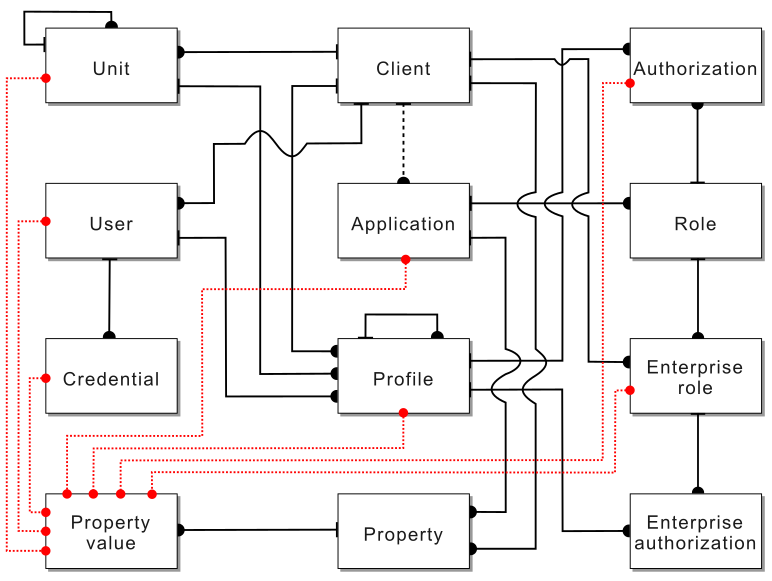
- Client
- A nevisIDM instance may have one or more clients.
- A client has zero or more users.
- A client has zero or more application indirect relations.
- A client has zero or more enterprise roles.
- User
- A user is unique on a client level.
- A user cannot be moved to another client.
- A user has one or more profiles.
- A user has zero or more credentials.
- Application
- A nevisIDM instance may have one or more applications.
- An application can belong to zero or more clients.
- An application has zero or more roles.
- Role
- A role is unique on a client level.
- A role cannot be moved to another client or application.
- Enterprise role
- An enterprise role is unique on a client level.
- An enterprise role cannot be moved to another client.
- An enterprise role has zero or more roles.
- Profile
- A profile is unique on a client level.
- A profile cannot be moved to another client.
- A profile can be assigned to exactly one unit.
- In the object model, a profile is connected to a role through an authorization.
- In the object model, a profile is connected to an enterprise role through an enterprise authorization.
- In the REST API, a profile is directly connected to zero or more roles.
- In the REST API, a profile is directly connected to zero or more enterprise roles.
- In the REST API, a profile has zero or more authorizations.
- In the REST API, a profile has zero or more enterprise authorizations.
- Unit
- A unit is unique on a client level.
- A unit cannot be moved to another client.
- A unit has zero or one parent unit.
- If a unit has no parent unit, it is considered as a root unit.
- There may be multiple root units.
- A unit has zero or more profiles.
- Property
- A nevisIDM instance may have zero or more properties.
- Properties can be assigned to clients.
- Properties can be assigned to applications.
- Each property has an object scope that defines its relation to other objects.
- A property is unique on its object scope.
- Properties can have uniqueness scope that defines its uniqueness checks.
- Properties can have zero or more property values.
- Property value
- Property values are unique on the defined uniqueness scope.
- A property value is related to an object defined by object scope.
- Means: if a property defined on user scope, the property value is related to a user.
Updating an object - optimistic locking
When using the PATCH request to modify an object, it is possible that the originator of the request accesses and updates stale data. This occurs when the same object is being updated by another originator at the same time. This may result in accidental overwriting of data.
To ensure data consistency, the version parameter of the objects can be used upon modifying data. It is set to default when an object is created, and it is incremented each time an object is modified.
When including the version number in the body of the PATCH request, nevisIDM checks whether the version of the object being modified is up to date. If it is, the modification is stored, if it is not, an error message is returned with 409 Conflict status code.
Example request body
When updating the application with the given external ID (PATCH).
-
Request (application/json)
- Body
{"extId": "1001","version": 10,"name": "Confluence","url": "www.newurl.com/confluence/"} -
Response 200
If the application with extId 1001 has the version of value 10.
- Response 409
If the application with extId 1001 has the version of value different than 10.
- Body
  {
     "errors": [{
        "code": "errors.optimisticLockingFailure",
        "message": "Row was updated or deleted by another transaction (or unsaved-value mapping was incorrect) : [ch.adnovum.nevisidm.service.dto.Application#1001]"
     }]
  }
Note that if the version number is not included in the request body, the object is modified regardless of its version. This may lead to inconsistent data.
Pagination of result lists
When performing a GET request to retrieve a list of results, the result set can be limited to improve performance. By default, the number of results returned is set to 1000. To access the next page of results, a continuation token is used. The limit and/or continuation token are expected in the URL as query parameters (limit and continuationToken).
Example of pagination
When sending a GET request to the following URL: https://your-host/nevisidm/api/core/v1/clients?limit=3
-
Response 200 (application/json)
- Body
{"items": [{"created": "2018-09-09T00:00:00Z","lastModified": "2018-12-21T14:38:45Z","version": 1,"extId": "1000","name": "client1"}, {"created": "2018-09-09T00:00:00Z","lastModified": "2018-12-21T14:38:45Z","version": 1,"extId": "1001","name": "client2"}, {"created": "2018-09-09T00:00:00Z","lastModified": "2018-12-21T14:38:45Z","version": 1,"extId": "1002","name": "client3"}],"_pagination": {"continuationToken": "1536444000000_1002","limit": 3}}
The continuationToken in the response body can be used to retrieve the next set of results by including it in the URL, for example: https://your-host/nevisidm/api/core/v1/clients?limit=3&continuationToken=1536444000000_1002
Filtering of result lists
When performing a GET request to retrieve a list of results, the result set can be filtered using request query parameters. (Support for filtering by custom properties is currently only available for users.) All endpoints that support filtering are marked with the tag:
Filter
If nothing else is indicated, all attributes of the returned DTO are supported as query parameters. Nested attributes can be used by composing the attributes with a ..
Example of filtering
When sending a GET request to the URL https://your-host/nevisidm/api/core/v1/clients/100/users?userState=active&address.countryCode=ch, all active users in Switzerland are returned.
-
Response 200 (application/json)
- Body
{"items": [{"created": "2020-10-07T08:14:23Z","lastModified": "2020-10-07T08:14:23Z","version": 0,"extId": "1000","clientExtId": "100","userState": "active","loginId": "userA","languageCode": "de","isTechnicalUser": false,"name": {"title": "Ms.","firstName": "User","familyName": "A"},"sex": "female","gender": "female","birthDate": "1984-05-08","address": {"postalCode": "8000","city": "Zurich","street": "Bahnhofstrasse","houseNumber": "100","countryCode": "ch"},"contacts": {"telephone": "0444444444","mobile": "0794444444","email": "[email protected]"}}, {"created": "2020-10-07T08:14:23Z","lastModified": "2020-10-07T08:14:23Z","version": 0,"extId": "1001","clientExtId": "100","userState": "active","loginId": "userB","languageCode": "en","isTechnicalUser": false,"name": {"title": "Mr.","firstName": "User","familyName": "B"},"sex": "male","gender": "male","birthDate": "1984-05-08","address": {"postalCode": "8000","city": "Zurich","street": "Poststrasse","houseNumber": "200","countryCode": "ch"},"contacts": {"telephone": "0445555555","mobile": "0765555555","email": "[email protected]"}}],"_pagination": {"continuationToken": "1602051280000_1001","limit": 1000},"_classifications": {"personal": ["name.firstName","name.familyName","contacts.mobile"],"gov": ["address"]}}
Information classification with the REST API – GDPR business case
The General Data Protection Regulation (GDPR) is a regulation issued by the European Union to strengthen and unify data protection. The REST API of nevisIDM allows marking user-related data to classify information, as required in the GDPR business case.
Configuration
Marking user-related data is possible through client policy configuration. The following is a sample configuration of the client policy:
data.classifications=[gov, sensitive, personal]

data.classifications.personal.user=[name.firstName, name.familyName, contacts.mobile]
data.classifications.sensitive.user=[birthDate]
data.classifications.gov.user=[languageCode]

data.classifications.personal.user.properties=[propertyName1, propertyName2]

data.classifications.personal.profile=[remarks, modificationComment]
data.classifications.gov.profile=[profileState]

data.classifications.personal.profile.properties=[propertyName1, propertyName2]
The declaration of the customized classification levels occurs in the client policy configuration parameter _data.classifications{_}. The only limitation on the defined levels is that they have to match the following regular expression: [a-zA-Z0-9]+.
The declaration of parameters occurs in line with the syntax data.classifications.<level>.<object>.
Before you use a classification level, declare it in the client policy configuration parameter data.classifications. Otherwise, a validation error occurs. For example, the following client policy configuration is not accepted:
data.classifications=[gov, sensitive, personal]
data.classifications.undefined.user=[name.firstName,name.familyName, contacts.mobile]
The validation of parameters enforces the rule set of the object. Therefore, the validation does not accept any item that is not part of the object returned by the corresponding REST service. The supported objects are those of the user and profile. Moreover, user properties and profile properties can be classified as well. The validation is case-sensitive and the hierarchical relationships among parameters are enforced, too. Hence, the following scenarios are rejected:
data.classifications.personal.user=[firstName, contacts.MOBILE]
data.classifications.sensitive.user=[randomName]
data.classifications.gov.user=[mobile]
REST response format
The following responses are returned in this format only if you have configured an applicable client policy.
When querying a single user:
//GET /users/12345
{
   "extId": "12345",
   "name": {
      "firstName": "Maria",
      "familyName": "Meier"
   },
   "_classifications": {
      "personal": ["name.firstName", "birthDate", "contacts.mobile"],
      "sensitive": ["birthDate"],
      "gov": ["language"]
   }
}
When querying a list of users:
//GET /clients/{extId}/users/
{
   "items": [{
      "extId": "12345",
      "name": {
         "firstName": "Maria",
         "familyName": "Meier"
      }
   }],
   "_classifications": {
      "personal": ["name.firstName", "name.familyName", "contacts.mobile"],
      "sensitive": ["birthDate"],
      "gov": ["languageCode"]
   }
}
When querying properties:
//GET /{clientExtId}/profiles/{extId}/properties/
{
   "propertyName1": "value1",
   "propertyName2": "value2",
   "propertyNameN": "valueN",
   "_classifications": {
      "personal": ["propertyName1", "propertyName2"]
   }
}