Delegated administration
Delegated administration in Nevis ID lets the people closest to the users manage them, within limits that you set. An administrator role is assigned to a profile, and its scope (Nevis Dataroom) names the tenants, units, applications, and enterprise roles where the role applies. The scope for a unit covers the unit and all its subunits, never the parent unit. An administrator can hand on a role only inside their own scope.
The industry also calls this delegated management, scoped administration, or an administrative boundary.
This page uses the fictional company Silvretta Insurance. For its structure, see Units and the organizational hierarchy.
What is an administrator role?
An administrator role is a role of Nevis ID itself. It is the only kind of role that allows anything inside Nevis ID. Each administrator role holds a set of permissions, such as creating users or changing units. For the other kinds of role, see Applications, roles, and enterprise roles.
| Built-in role | What it is for |
|---|---|
| ClientRoot | Administering a whole tenant |
| UserAndUnitAdmin | Administering users and units |
| UserAdmin | Administering users |
| Helpdesk | Supporting users, including their credentials |
| AppAdmin | Administering applications and their roles |
| AppOwner | Assigning the roles of an application |
| EnterpriseRoleAdmin | Administering enterprise roles |
| EnterpriseRoleOwner | Assigning enterprise roles |
| SelfAdmin | Letting a user manage their own data and credentials |
An authorization assigns an administrator role to a profile, like any other role. The administrator role is therefore in force only in a session that uses this profile. For more information, see Users, profiles, and credentials.
Where does an administrator role apply?
The authorization for an administrator role has a scope (Nevis Dataroom). The scope says where the role applies. It is a part of the authorization, not an object of its own.
| Dimension of the scope | Nevis name | Limits the role to |
|---|---|---|
| Tenant | Client dataroom | The tenants that the scope names |
| Unit | Unit dataroom | The units that the scope names, with all their subunits |
| Application | Application dataroom | The applications that the scope names |
| Enterprise role | Enterprise role dataroom | The enterprise roles that the scope names |
Most Nevis documentation speaks of the first three datarooms. The fourth is available when you use enterprise roles.
Each dimension is either unlimited or limited to named objects. To act on an object, an administrator needs the permission, the tenant of the object, and its unit.
The scope for a unit covers that unit and every unit below it. It never covers the parent unit, a unit beside it, or another tree.
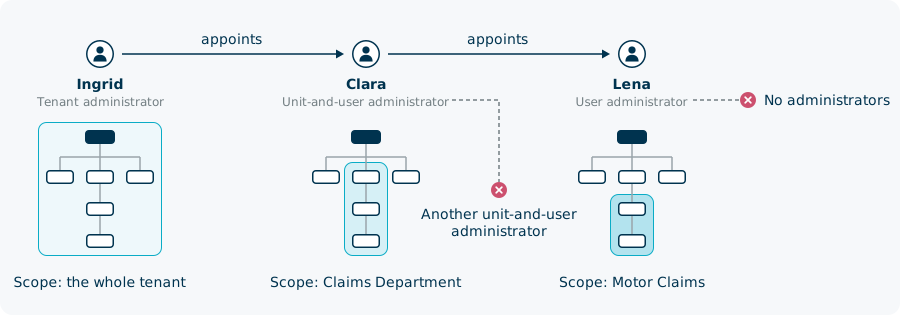
Silvretta Insurance has three administrators:
| Person | Role | Scope |
|---|---|---|
| Ingrid | Tenant administrator (ClientRoot) | The whole tenant |
| Clara | Unit-and-user administrator (UserAndUnitAdmin) | The unit Claims Department |
| Lena, on her administration profile | User administrator (UserAdmin) | The unit Motor Claims |
Clara administers the Claims Department, Motor Claims, Property Claims, and Garage Keller AG. She cannot open Sales or Private Customers.

Can an administrator be limited in which roles they assign?
The application and enterprise role dimensions limit which roles an administrator can assign. An administrator then manages the users of a unit and hands out roles from a fixed catalog only. The limits apply in the administration console and over the REST API.
Silvretta Insurance runs two applications, Claims Desk and Policy Portal, and has two enterprise roles, Claims Adjuster and Senior Adjuster.
| The scope of Clara names | Clara can |
|---|---|
| The unit Claims Department | Manage the users of the Claims Department and its subunits |
| The application Claims Desk | Assign the roles of Claims Desk, and no role of Policy Portal |
| The enterprise role Claims Adjuster | Assign Claims Adjuster, and not Senior Adjuster |
Clara can give Sofia, a new claims adjuster in Motor Claims, the enterprise role Claims Adjuster, or a single role of Claims Desk. She cannot give anyone a role of Policy Portal. For more information on these roles, see Applications, roles, and enterprise roles.
Which users can an administrator open and change?
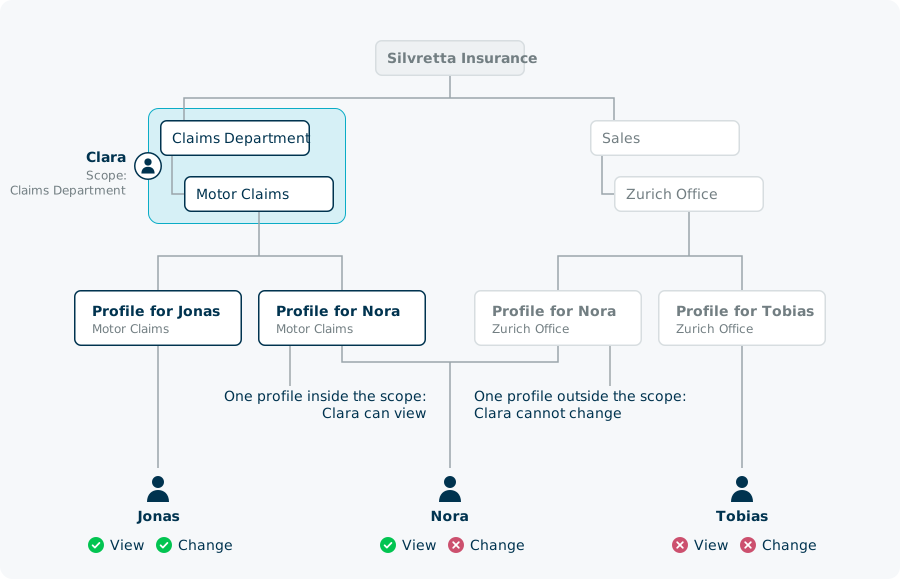
A user has no unit. An administrator reaches a user through the units of the profiles of that user. To change a user, every profile of the user has to lie inside the scope. To view a user, one profile inside the scope is enough.
| The user | Clara can view | Clara can change |
|---|---|---|
| Jonas, with one profile in Motor Claims | Yes | Yes |
| Nora, with one profile in Motor Claims and one in the Zurich Office | Yes | No |
| Tobias, with one profile in the Zurich Office | No | No |
The scope decides which users and units an administrator can open and change. A search in the tenant can also show that a user or a unit outside the scope exists.
What stops delegation from going too far?
Four rules bound what an administrator can hand on.
| Rule | Example |
|---|---|
| The scope never grows. An administrator can hand on a role only with a scope inside their own. | Clara cannot make anyone administrator of Sales, or of the whole tenant. |
| A role can hand out only certain roles. | Clara can appoint a user administrator. She cannot appoint another unit-and-user administrator. |
| A role goes only to a profile that the administrator can reach. | Clara can appoint Lena, whose profile is in Motor Claims. She cannot appoint Tobias. |
| An administrator can change only users who hold certain roles. | Clara can change Jonas. She cannot change Lena, because Lena holds an administrator role. |
The administration console applies these rules as you work. It offers an administrator only the roles that they can hand out, and only the profiles inside their scope.
How far can administrator roles be passed on?
| Administrator | Can appoint |
|---|---|
| Tenant administrator | Unit-and-user administrators, user administrators, help desk staff, and administrators of applications and enterprise roles |
| Unit-and-user administrator | User administrators |
| User administrator | No administrators |
| Application administrator | Application owners |
| Enterprise role administrator | Enterprise role owners |
The chain has this length whatever the depth of the unit tree. Ingrid appoints Clara for the Claims Department, and Clara appoints Lena for Motor Claims. To have a unit-and-user administrator for Motor Claims as well, Ingrid appoints one.
The Helpdesk role can change users who hold some administrator roles, including their credentials. Give it with the same care as an administrator role.
Which permissions a role holds, which roles it can hand out, and whose users it can change are settings of your instance. For more information, see nevisIDM Authorizations in the patterns reference.
What happens when the organization or an administrator changes?
| Change | Effect on administration |
|---|---|
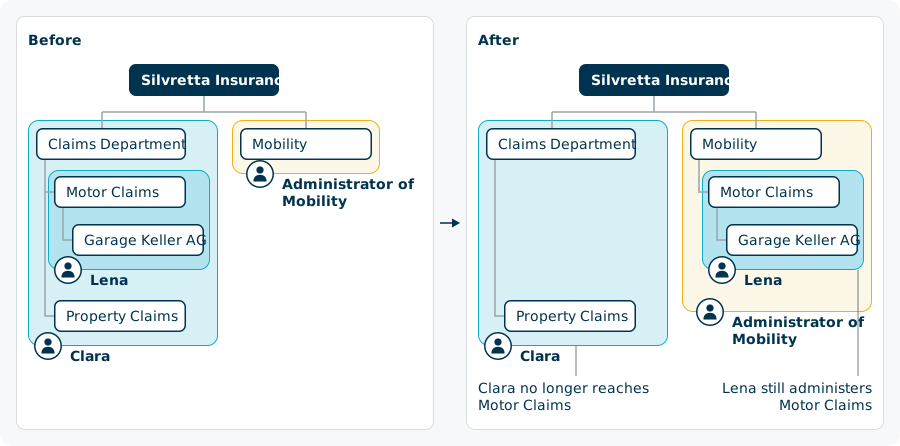
| A unit moves to another branch, with its subunits | The administrator of the new parent unit reaches it. The administrator of the old parent unit no longer does. |
| A unit is detached and becomes a root unit | The administrators of the old tree no longer reach it. The administrator of the unit itself keeps it. |
| The profile of an administrator is assigned to another unit | Nothing. The scope names units, not the place of the administrator. |
| A unit is deleted | It disappears from every scope that named it. |
| The authorization of an administrator is removed | Everything that this administrator granted stays. |
| An administrator logs in with another profile | The administrator role is not in force in that session. |
An administrator who is already working may notice a change with a delay.
Silvretta Insurance moves Motor Claims from the Claims Department to the new Mobility division. Lena still administers Motor Claims, because her scope names that unit. Clara no longer reaches it, and the administrator of Mobility does.
Can an administrator role be limited further?
A role is a set of permissions, so a role with fewer permissions can do less. In addition, the permissions to view and to change a user can be limited to named fields of the user. A help desk role can then change the state of a user and nothing else.
Both limits belong to the role. They apply to everyone who holds the role, in every tenant of the instance.
What can users manage for themselves?
The SelfAdmin role lets a user manage their own data, login ID, and credentials. Every new profile receives it.
The role has no scope, because it reaches only the user who holds it. Lena, on her profile for daily work, can change her own name and manage her own credentials. She cannot open a colleague or her own unit, and she cannot give herself a role.
Delegated administration facts at a glance
| Fact | Value |
|---|---|
| Administrator role assigned to | A profile, through an authorization |
| Dimensions of the scope | Tenant, unit, application, enterprise role |
| Roles that an administrator can assign | Those of the applications and enterprise roles that the scope names |
| Each dimension | Unlimited, or limited to named objects |
| Scope for a unit | The unit and all its subunits, never the parent unit |
| To view a user | One profile of the user inside the scope |
| To change a user | All profiles of the user inside the scope |
| Scope that an administrator can hand on | Inside their own scope |
| When a unit moves | The scope follows the unit |
| When the profile of an administrator moves | The scope stays as it was |
| When the authorization of an administrator is removed | What the administrator granted stays |
| Name of the scope in the data model and in API messages | Dataroom |
Related content
- Units and the organizational hierarchy: the unit tree that a scope refers to
- Users, profiles, and credentials: the profile that holds an administrator role
- Applications, roles, and enterprise roles: the roles of your applications
- Tenants and isolation: the tenant (Nevis Client) as the first dimension of a scope
- B2B organization structures: the administrator of a partner company
- Multi-tenancy and Delegated Administration: the capability at a glance
- Administration APIs: Create a new authorization and Get caller user permissions