Units and the organizational hierarchy
Nevis ID models an organization as a hierarchy of units. A unit stands for one part of the organization, such as a company, a division, a department, a brand, or a business partner. Units form trees inside a tenant (Nevis Client), with no configured depth limit and any number of trees side by side. Users belong to units through profiles, and delegated administration of a unit always covers its subunits and never its parent unit.
The industry also calls this model organizational hierarchy, organizational units, or organization management.
This page builds the model step by step with one fictional company, Silvretta Insurance.
Why does Nevis ID organize users in units?
A flat list of users is enough while all users are the same kind of customer and one team manages them. Most organizations are not like that.
Silvretta Insurance sells to private customers in two countries. It has a claims department with separate teams for motor claims and property claims, and it has sales offices in two cities. Each country team wants to manage its own customers. The claims department wants to manage its own staff. Nobody in sales is allowed to administer the staff of the claims department.
You could store the department of each user as an attribute of the user. An attribute describes a person, but you cannot manage it as an organization. An attribute cannot contain other departments, and you cannot make an administrator responsible for it.
Nevis ID therefore models the organization itself. Each part of the organization is a unit, and users are linked to the units.
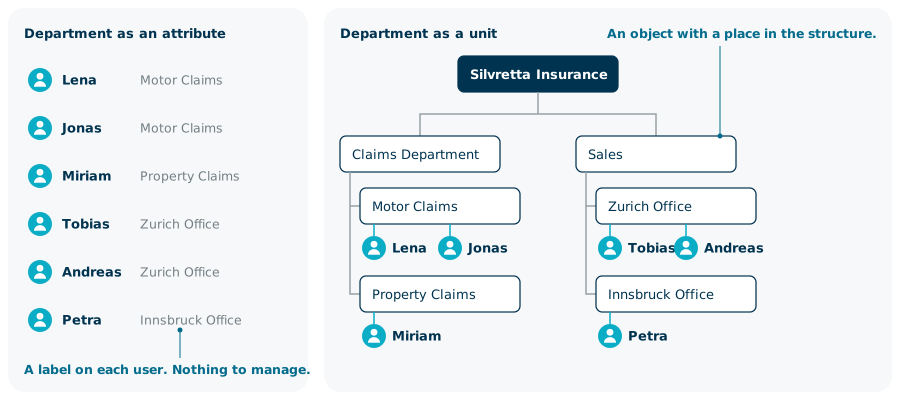
What is a unit in Nevis ID?
A unit is an object that represents one part of an organization. You decide what a unit represents: a legal entity, a division, a department, a country, a brand, or a partner company.
A unit has an identity of its own, independent of the profiles that belong to it:
- An external ID that never changes. Applications and integrations use it to refer to the unit.
- A technical name, and a display name and an abbreviation in each supported language.
- A state and an optional validity period.
- Optionally, its own policy and its own custom attributes, which Nevis ID calls properties.
The unit stays the same object when profiles are added and removed, and when the unit is renamed.
How does a unit differ from a tenant?
A unit always belongs to exactly one tenant. A tenant separates one user population from all others: the users, policies, and units of a tenant are its own. For more information on tenants, see Tenants and isolation.
A tenant is not a unit, and tenants do not contain other tenants. You build all structure inside a tenant with units.
| Your need | What you use in Nevis ID |
|---|---|
| Keep two user populations apart, each with its own policies | Separate tenants |
| Represent the companies, divisions, and departments of one population | Units in a tree |
| Let one person belong to two parts of the organization | One user with a profile in each unit |
How do units form an organizational hierarchy?
Every unit has at most one parent unit. A unit without a parent is a root unit. A unit below another unit is a subunit of that unit. A root unit with all the units below it forms a tree.
Silvretta Insurance starts with one tree:
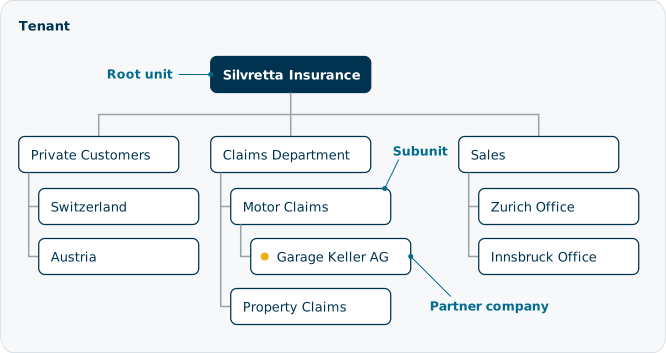
The tree holds departments, customer segments, and one external company in the same way. Nevis ID has no separate object type for a partner organization: a partner company is a unit like any other.
Can a tenant hold more than one tree?
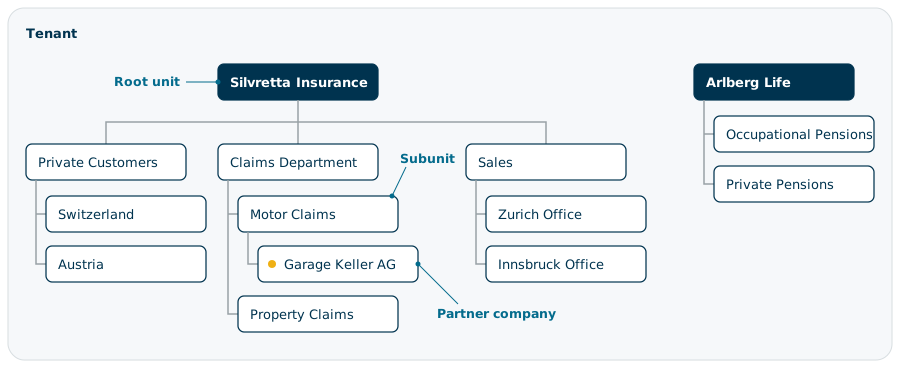
A tenant can hold several trees side by side, each with its own root unit. Silvretta Insurance later buys a life insurance company, Arlberg Life, and keeps it as a separate organization. Arlberg Life becomes a second root unit with its own subunits. An administrator who is responsible for one tree does not see the other tree.
The following figure shows both trees in the tenant:
What is the hierarchical name of a unit?
Every unit has a hierarchical name: the path from its root unit down to the unit itself. Nevis ID builds the path from the external IDs of the units, for example /silvretta/claims/motor.

An application that asks where a user belongs receives the path of the unit of the active profile. What the path looks like depends on the external IDs:
- Nevis ID generates the external ID of a unit, unless you set one when you create the unit. Silvretta Insurance set its own, so its paths are readable.
- The external ID of a unit does not change. If you rename a unit, its path stays the same, and a readable path can then differ from the name of the unit.
How deep can the unit hierarchy go?
Nevis ID does not set a maximum depth for a unit tree. You do not have to flatten your organization to fit a preset number of levels.
Real organizations need few levels. A multinational group with divisions, departments, and teams fits in about five levels. The unit hierarchy supports trees that are far deeper than that.
The word levels has a second meaning that is not about depth. It can also mean how many times the authorization to administer is passed on, from one administrator to the next. Tree depth does not limit that chain. The administrator roles and the scope (Nevis Dataroom) limit it: each role can appoint only certain other roles, and only inside its own scope. For more information, see Delegated administration.
How does a user belong to a unit?
A user does not belong to a unit directly. A profile makes the connection.
A profile links a user to one unit and carries the authorizations that the user has there. On this page, a profile is this link. It is not a set of personal attributes.
- A profile belongs to exactly one user and exactly one unit.
- A user can have several profiles, in the same unit or in different units.
Lena handles motor claims and also covers two days a week in Property Claims. Lena is one user with a profile in each team.

For more information on credentials, the active profile of a session, and the profile that an AI agent uses, see Users, profiles, and credentials.
Does every unit hold users?
Some units exist only to group other units. Private Customers at Silvretta Insurance groups the countries, and no customer profile belongs to Private Customers itself. You can set up such a unit so that it holds no profiles. The profile of every customer then belongs to a country unit.
Where do new users start?
Each tenant has a default unit. Users who register themselves receive a profile in the default unit. In a structured organization, a later step places the profile in the unit that matches the place of the user in the organization.
Placing the profile changes who administers the user. It does not add authorizations; the profile keeps the ones it received at registration.
What follows the unit hierarchy, and what does not?
The hierarchy matters because some things follow it downward. Not everything does.
What follows the hierarchy?
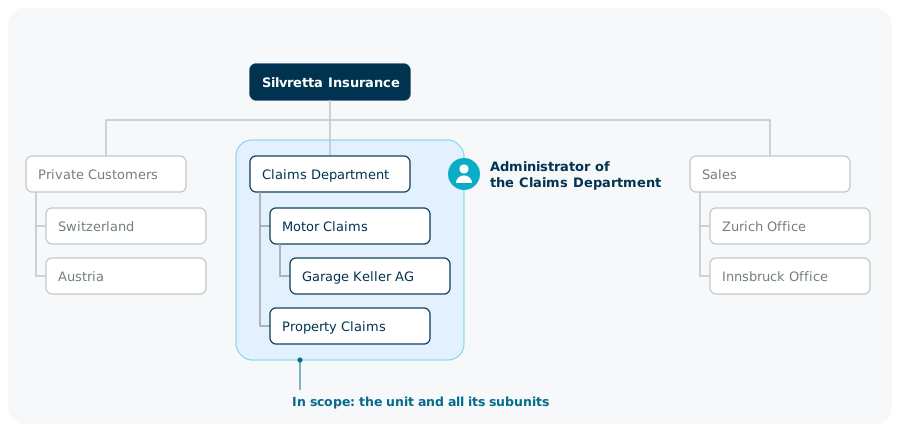
Administration follows the hierarchy. The scope of an administrator for a unit includes that unit and all its subunits. The scope never includes the parent unit or the units beside it.
The administrator of the Claims Department at Silvretta Insurance manages the Claims Department, Motor Claims, Property Claims, and Garage Keller AG. That administrator cannot reach Sales or Private Customers. The administrator of the Zurich Office manages that office and nothing else.
The position of a user is also available to your applications. An application can receive the unit of the profile that the user logged in with, including its path and attributes, and decide on that basis.
What does not follow the hierarchy?
Settings that you make on a unit apply to that unit. They do not pass to its subunits.
| Aspect | Applies to | Passes to subunits |
|---|---|---|
| Administration scope | The unit and all its subunits | Yes |
| Hierarchical name | Derived from the chain of parent units | Yes |
| State | The unit | No |
| Validity period | The unit and the profiles directly in it | No. The period of a subunit has to lie inside the period of its parent unit. |
| Property values | The unit | No |
Two examples show the difference:
- An end date on the Claims Department does not set an end date on Motor Claims. Motor Claims needs its own end date first, and that date cannot be later.
- A property value
market = DACHon Sales does not give the Zurich Office a market.
Roles do not follow the hierarchy either. A role belongs to an application, and all units of the tenant share it. Units answer the question where a user belongs. Roles answer the question what the user is allowed to do. An application can combine both answers. For more information on roles, see Applications, roles, and enterprise roles.
What happens when the organization changes?
Organizations change, and the unit hierarchy changes with them without anything being created again.
What happens when a unit moves?
A unit moves together with everything below it. Silvretta Insurance creates a Mobility division and moves Motor Claims into it. The Motor Claims unit moves in one operation, with Garage Keller AG below it. The profiles of the people in both units stay as they are.
Administration follows the move. The administrator of the new parent unit now reaches the moved branch, and the administrator of the old parent unit no longer does. An administrator who is already working may see the change with a delay.
The hierarchical names of all units in the moved branch change to the new path. The path of Motor Claims changes from /silvretta/claims/motor to /silvretta/mobility/motor.
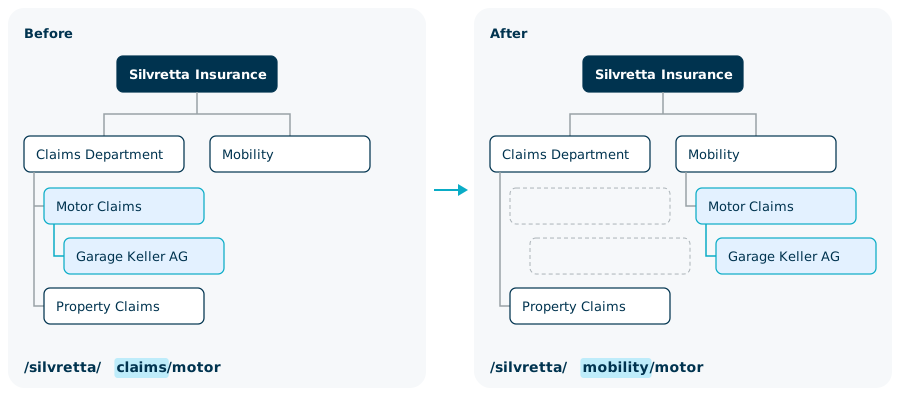
Three rules bound a move:
- A unit moves only inside its tenant.
- A unit cannot move under one of its own subunits.
- A unit can be detached from its parent and become the root unit of a new tree.
A root unit can also move under another unit. If Silvretta Insurance later integrates Arlberg Life as a division, the Arlberg Life root unit moves under Silvretta Insurance with its whole tree.
What happens when a person changes department?
A user is linked to a unit only through a profile, so there is no user to move. You move the profile: it is assigned to the other unit. The user, the credentials, and the profile itself stay the same.
The profile keeps its authorizations when it moves. Authorizations that belonged to the old department stay on the profile until you remove them.
What happens when a unit is no longer needed?
You can delete a unit only when it is empty: it has no subunits and holds no profiles. A branch is therefore deleted from the bottom up, one unit after the other.
To empty a unit, move its profiles to another unit or delete them. A disabled profile still counts. If you delete the only profile of a user, the user remains but can no longer log in.
Who decides about the structure?
The right to extend a tree downward and the right to start a new tree are separate. A delegated administrator can build and reshape the branch that they are responsible for. Creating a root unit needs an additional permission, which stays with the administrators of the tenant.
Do units also structure customers and partner companies?
The same unit hierarchy serves employees, consumers, and partner companies, in the same tenant if you want.
The simplest structure for consumers is no structure: every consumer has one profile in the default unit. Units start to matter when you administer consumers in parts. Silvretta Insurance places the profiles of its private customers in a unit for each country, so that each country team manages its own customers.
A partner company is a unit inside your tenant, such as Garage Keller AG below Motor Claims. For more information on how partner companies map onto units, see B2B organization structures.
Unit hierarchy facts at a glance
| Fact | Value |
|---|---|
| Tenants per unit | Exactly one |
| Parent units per unit | At most one |
| Trees per tenant | One or more, each with its own root unit |
| Depth of a tree | No configured limit |
| Units per profile | Exactly one |
| Profiles per user | Any number, in the same unit or in different units |
| Hierarchical name | Path of external IDs from the root unit |
| Languages for display names | English, German, French, and Italian |
| Scope of administration for a unit | The unit and all its subunits, never the parent unit |
Related content
- Users, profiles, and credentials: how one person holds several profiles with separate authorizations
- Tenants and isolation: the tenant (Nevis Client) that a unit belongs to
- Delegated administration: administrator roles, their scope (Nevis Dataroom), and the rules of delegation
- B2B organization structures: partner companies in the unit tree
- Multi-tenancy and Delegated Administration: tenants, administrator roles, and the scope of administration
- B2B and Organization Management: partner organizations, enterprise roles, and provisioning
- Unit APIs: Create a unit, Move a unit, List child units, and Change the unit of a profile
- Data model: the tenants of a Nevis ID instance