B2B organization structures
Nevis ID models a partner company as a unit in the unit tree of your tenant, with its offices and divisions as subunits. The people of the partner company have profiles in these units and receive application roles and enterprise roles, like any other profile. The partner company administers its own users, and you keep control of the authorizations. You define the roles and enterprise roles, and you decide which of them each partner company can assign. One person who works for several partner companies is one user with a profile in each.
The industry also calls this partner IAM (PIAM), B2B CIAM, IAM services for organizations, or organization management.
This page uses the fictional company Silvretta Insurance. It builds on Units and the organizational hierarchy.
Where does a partner company sit in the unit tree?
Nevis ID has no separate object for a partner company. A partner company is a unit, and where you place the unit decides who manages it.
| Placement | Example | Who covers the partner company |
|---|---|---|
| Under a department | Garage Keller AG and Autohaus Brandt GmbH below Motor Claims | The administrators of Motor Claims and of the Claims Department, with no further setup |
| In a branch of its own, with other companies of the same kind | Fontana Brokers SA and Hadley Moore Brokers Ltd below Brokers | The administrator of Brokers, independent of the departments |
| As a root unit | A partner company with a tree of its own | The tenant administrator |
Silvretta Insurance works with repair garages and with insurance brokers:
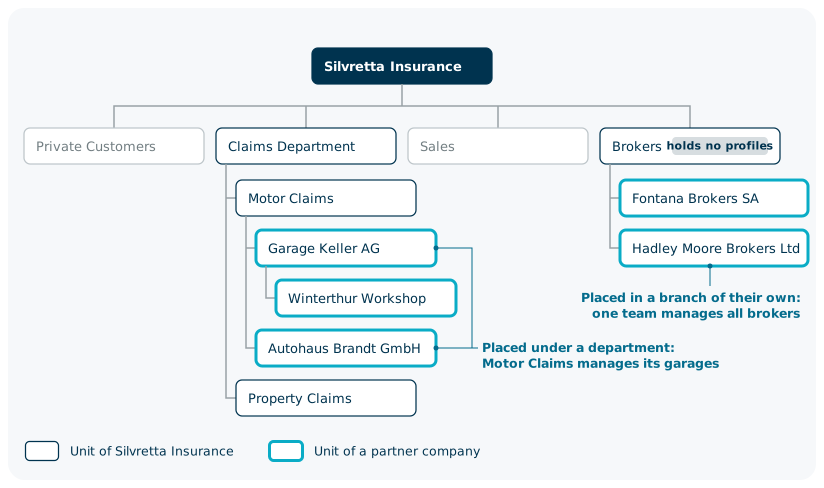
Brokers groups the broker companies and holds no profiles itself. When Silvretta Insurance moves Motor Claims to another division, both garages move with it.
Who administers the users, and who controls the authorizations?
A partnership splits the administration in two. The partner company administers its own users, because it knows who joins, who leaves, and who does which job. You keep control of the authorizations, because the applications are yours and you answer for who can reach them.
| Decision | Who decides |
|---|---|
| Which roles an application has | Silvretta Insurance |
| Which roles an enterprise role contains | Silvretta Insurance |
| Which roles and enterprise roles a partner company can assign | Silvretta Insurance, through the scope of the administrator of the partner company |
| Who works for the partner company | Garage Keller AG, which creates, changes, and disables its users |
| Which person receives which role | Garage Keller AG, from the roles that it can assign |
| Which offices the partner company has | Garage Keller AG, below its own unit |
What does Silvretta Insurance control?
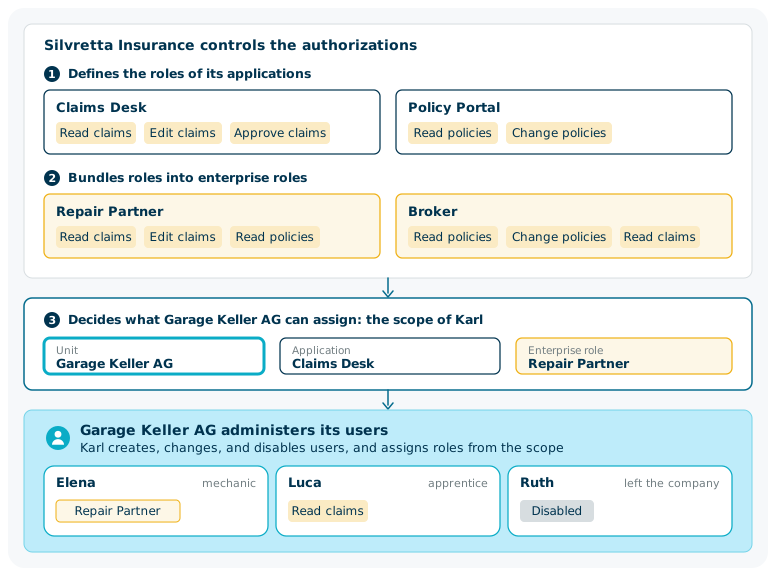
Silvretta Insurance defines the roles of its applications and bundles them into enterprise roles. It defines one enterprise role for each kind of partner company, not one for each company.
| Enterprise role | Contains | Made for |
|---|---|---|
| Repair Partner | Read claims, Edit claims (Claims Desk), and Read policies (Policy Portal) | The people of the garages |
| Broker | Read policies, Change policies (Policy Portal), and Read claims (Claims Desk) | The people of the broker companies |
Silvretta Insurance then decides what each partner company can assign. Ingrid, the tenant administrator, appoints Karl as the administrator of Garage Keller AG. The scope of Karl names the unit Garage Keller AG, the application Claims Desk, and the enterprise role Repair Partner.
The control stays with Silvretta Insurance after this handover:
- When it removes Edit claims from Repair Partner, every profile with that enterprise role loses the role, at both garages. No administrator of a garage is involved.
- When it removes Repair Partner from the scope of Karl, he can no longer assign it.
- Clara, whose scope names the unit Claims Department, reaches the people of both garages and can step in.
What does the partner company administer?
Karl administers the people of Garage Keller AG without asking Silvretta Insurance.
| Karl can | Karl cannot |
|---|---|
| Create Elena, a new colleague, in Garage Keller AG | Open a person of Autohaus Brandt GmbH or of Motor Claims |
| Give Elena the enterprise role Repair Partner | Give anyone the enterprise role Broker |
| Give Luca, an apprentice, the single role Read claims of Claims Desk | Give anyone a single role of Policy Portal |
| Disable Ruth, who left the company | Change what Repair Partner contains |
| Create a second office below Garage Keller AG | Create a unit outside Garage Keller AG |
| Appoint Marek as user administrator of the Winterthur Workshop | Appoint an administrator for another company |
A profile at a partner company holds roles like any other profile: single application roles, enterprise roles, or both. A mechanic reads a claim, adds the repair report to it, and checks what the policy covers, so Elena receives Repair Partner. Luca, an apprentice, only looks up claims and receives the single role Read claims.
Your applications receive the roles and the unit of the profile together. Claims Desk shows Elena the claims that Garage Keller AG repairs, because her profile belongs to that unit.
For more information, see Delegated administration and Applications, roles, and enterprise roles.
What can differ from one partner company to the next?
| Set for each partner company | The same for all partner companies in the tenant |
|---|---|
| The unit, with its offices and divisions | The applications and their roles |
| The administrators and their scope | The enterprise roles |
| The catalog of roles that an administrator can assign | The login IDs, which are unique in the tenant |
| The credential types that the unit accepts | The terms, which belong to an application |
What if one person works for two partner companies?
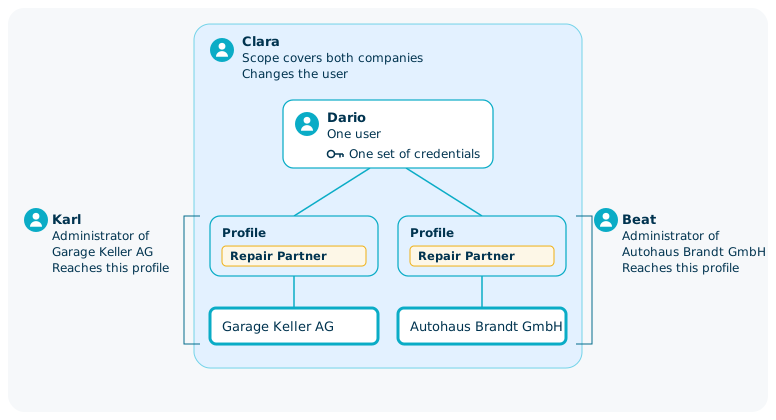
Dario assesses damage for Garage Keller AG and for Autohaus Brandt GmbH. He is one user with one set of credentials and a profile in each company.
- At login, Dario chooses the profile. The session holds the roles of that profile only.
- Karl and Beat, the administrator of Autohaus Brandt GmbH, each reach the profile in their own company.
- An administrator whose scope covers both companies changes Dario himself, for example his name or his state. Here that is Clara.
- Every action is recorded for one person.
When Dario stops working for Autohaus Brandt GmbH, that profile is deleted. His user, his credentials, and his profile at Garage Keller AG stay. For more information, see Users, profiles, and credentials.
Which business models does this structure cover?
| Model | Who logs in | Example at Silvretta Insurance | Structure |
|---|---|---|---|
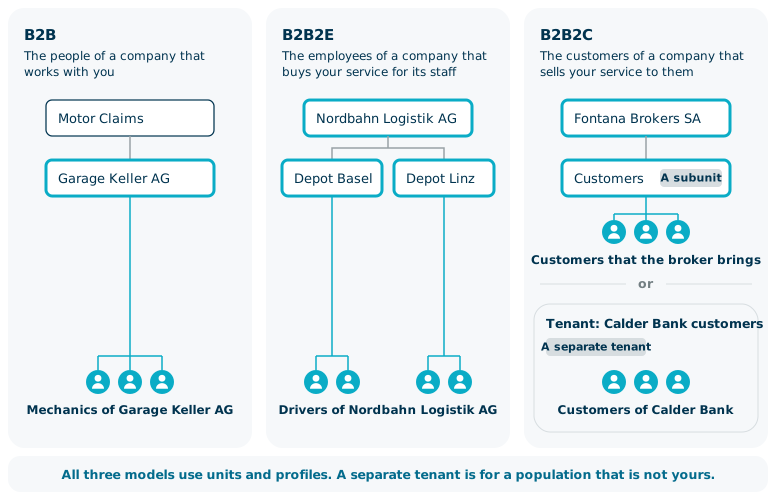
| B2B | The people of a company that works with you | The mechanics of Garage Keller AG, the brokers of Fontana Brokers SA | A unit for each company |
| B2B2E | The employees of a company that buys your service for its staff | The drivers of Nordbahn Logistik AG, which insures its fleet | A unit for the company, with subunits for its sites |
| B2B2C | The customers of a company that sells your service to them | The customers that a broker brings, and the customers of Calder Bank | A subunit for the customers of the company, or a separate tenant |
The three models use the same objects. A B2B2C population needs a separate tenant when its users are not your users, such as the customers of Calder Bank.
When does a partner company need a tenant of its own?
| Your need | What you use |
|---|---|
| The administrator of a partner company manages only its own people | A unit |
| One person works for several partner companies with one login | Units in one tenant |
| A department of yours manages the partner company with its own staff | A unit below that department |
| The partner company has its own login IDs, policies, templates, and enterprise roles | A separate tenant |
For more information, see Tenants and isolation.
How do the people of a partner company get into Nevis ID?
- An administrator or a provisioning system creates the user directly in the unit of the partner company, together with the roles. For more information, see Integration, APIs, and Provisioning.
- An administrator invites a person with a link that expires. For more information, see Registration, Onboarding, and Identity Verification.
- The people of a partner company log in with the corporate identity provider of their company, and a user can be created at first login. For more information, see Federation and SSO.
What happens when a partner company reorganizes or leaves?
| Event | What you do | Result |
|---|---|---|
| Autohaus Brandt GmbH takes over the Winterthur Workshop | Move the unit | The profiles stay as they are. Beat reaches the office, and Karl no longer does. |
| A person leaves Garage Keller AG | Karl disables or archives the user | The person can no longer log in |
| The contract with a partner company ends on a known date | Set the end of the validity period on the offices, then on the company | From that date, the profiles in these units cannot be used to log in |
| Access of a partner company has to stop now | Disable its users | No person of the company can log in |
| The partner company is no longer needed | Delete the profiles, then the offices, then the company | The unit tree no longer holds the partner company |
The validity period of an office has to lie inside the validity period of its company. An end date is therefore set from the offices upward.
A partner company is deleted from the bottom up, by an administrator above it. A person who also works for another partner company keeps that profile. For more information on moving and deleting units, see Units and the organizational hierarchy.
B2B facts at a glance
| Fact | Value |
|---|---|
| Object for a partner company | A unit, with subunits for its offices and divisions |
| Depth of the structure of a partner company | No configured limit |
| User administration | The partner company, inside its own unit |
| Control of the authorizations | You: the roles, the enterprise roles, and what each partner company can assign |
| Administrator of a partner company | Limited to the unit of the company and its subunits |
| Roles that this administrator can assign | Those of the applications and enterprise roles that the scope names |
| Access of the people of a partner company | Application roles and enterprise roles, assigned to the profile |
| Enterprise roles | Defined once for the tenant, for all partner companies |
| A person in several partner companies | One user, with a profile in each company |
| Terms | Belong to an application |
| Reorganization of a partner company | A unit moves with everything below it |
| Protocols for a corporate identity provider | OpenID Connect (OIDC) and SAML |
Related content
- Units and the organizational hierarchy: the unit tree that holds a partner company
- Users, profiles, and credentials: one person with a profile in several companies
- Applications, roles, and enterprise roles: the roles and enterprise roles that the people of a partner company receive
- Tenants and isolation: when a population needs a tenant of its own
- Delegated administration: the scope of the administrator of a partner company
- B2B and Organization Management: the capability at a glance
- Organization APIs: Create a unit, Move a unit, Create a user (SCIM), and Create an enterprise authorization