Users, profiles, and credentials
In Nevis ID, a user is a person with one set of credentials, and a profile carries the authorizations of that user in one unit. Authorizations are assigned to a profile, never to a user. One user can hold several profiles and acts through one profile in a session, so each set of authorizations stays separate. Every action stays attributable to the one person behind the profiles.
The industry also calls this model multiple profiles per user or multiple personas per identity.
This page uses the fictional company Silvretta Insurance. For the structure of the company, see Units and the organizational hierarchy.
Why does Nevis ID separate the person, the credentials, and the authorizations?
Lena works at Silvretta Insurance. She approves motor claims every day. She also helps in Property Claims two days a week, and she administers the users of her own team.
Many systems solve this with more logins. Lena gets a second login for administration, or the team shares one administrative login. Both have a cost. With a shared login, nobody can tell who made a change. With a second login, Lena exists twice, and each copy has credentials that someone has to manage.
Nevis ID keeps three things apart:
| Thing | Object in Nevis ID | Question that it answers |
|---|---|---|
| The person | User | Who is it? |
| The proof | Credentials | How does the person prove it? |
| The authorizations | Profile | What is the person allowed to do, and where? |

What are a user, credentials, and a profile?
A user is a person, or a system that calls Nevis ID, in one tenant (Nevis Client). The user has a login ID.
Credentials belong to the user, not to a profile. A password, a passkey, a certificate, or another login method is registered once on the user. The login flow can restrict which of these credentials it accepts for a profile.
A profile is the link between a user and one unit. The profile carries the authorizations that the user has in that unit. On this page, a profile is this link. A profile is not a set of personal attributes, and it is not a second login.
- A profile belongs to exactly one user and exactly one unit.
- A user can have no profile, one profile, or several profiles.
- One profile of a user can be marked as the default profile.
What does a profile carry?
A profile carries authorizations. An authorization assigns one role to one profile. On this page, the word means this assignment. It does not mean the process of deciding whether a request is allowed. The industry also calls authorizations entitlements or access rights. A role is either a role of one of your applications or an administrator role of Nevis ID itself. For more information on roles, see Applications, roles, and enterprise roles.
Nevis ID never assigns a role to a user. To give a person authorizations in a unit, you give the person a profile in that unit and assign the role to the profile.
How can one person hold several profiles?
A user can have several profiles, in the same unit or in different units. Several profiles of one user are not duplicates that you have to merge.
Each profile has its own authorizations. The authorizations of one profile do not apply to another profile of the same user.
Lena has these profiles. Three are for her own work, and one is for an AI agent that works for her:
| Profile | Unit | Authorization |
|---|---|---|
| Daily work | Motor Claims | Application role to approve claims |
| Cover in the second team | Property Claims | Application role to edit claims |
| Team administration | Motor Claims | Administrator role, with Motor Claims as its scope |
| Profile of the AI agent | Motor Claims | Application role to read claims |

How does an AI agent fit the model?
An AI agent that works for a person has a profile of its own. The profile carries only the authorizations that the agent needs. An agent that prepares claims for Lena has a profile in Motor Claims with the authorization to read claims, and no authorization to approve them.
The profile of the agent belongs to the user Lena. One named person therefore owns the agent and is accountable for what the agent does. The authorizations of the other profiles of Lena do not apply to the agent. To withdraw the access of the agent, you disable or remove one profile, and the other profiles stay as they are.
The agent does not log in with the passkey of Lena. In this example, the login flow accepts only an API key or a certificate for the profile of the agent. Lena therefore cannot use the profile of the agent by mistake. If the login flow accepts only her passkey for the profiles of Lena, the agent cannot use them either.
Which profile is active in a session?
A session uses one profile, the active profile. Only the authorizations of the active profile apply. Nevis ID derives the permissions of a caller from the roles of the active profile.
For a user with several active profiles, the login flow selects the profile in one of two ways:
| Selection | What happens |
|---|---|
| By the user | The user chooses a profile by name at login. |
| By default | The login flow takes the default profile of the user. |
The default profile also serves logins in which no interaction with the user is possible.
Can the login flow require a particular credential for a profile?
The login flow can determine the profile first and decide afterward which credentials it offers and accepts. You define the rule. The flow can compare what it knows about the profile, such as a custom attribute that marks the kind of profile, with what it knows about each credential, such as its type or a custom attribute.
One possible rule:
| Profile | Credential that the login flow accepts |
|---|---|
| Daily work | Passkey or password |
| Team administration | Passkey only |
| Profile of the AI agent | API key or certificate only |
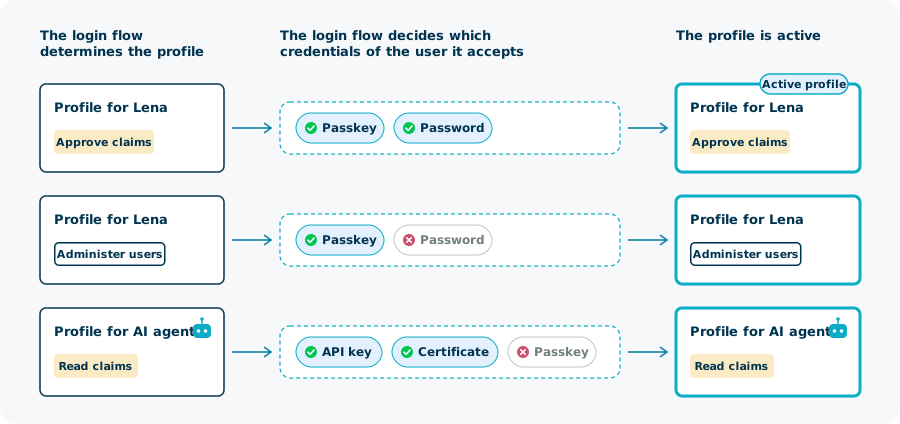
This is a setting of your login flow. Without it, a user can use any registered credential for any profile.
How does the model keep authorizations apart?
The model separates authorizations by profile.
- Far-reaching authorizations apply only while the profile that holds them is the active profile.
- Daily work through one profile does not carry the administrator role of another profile.
- The scope (Nevis Dataroom) of an administrator role limits it to named tenants, units, applications, and enterprise roles.
By default, the model does not separate authorizations by login: one set of credentials opens every profile of the user. You can add that separation in the login flow, which can require a particular credential for a particular profile. For a profile with far-reaching authorizations, the login flow can then demand a stronger credential than for the profile for daily work.
A Nevis ID instance also keeps the administrators of the instance in a tenant of their own, apart from your end users. For more information, see Tenants and isolation.
Who is recorded as the actor?
Nevis ID records every administrative change with the actor and the time. The actor is the user, whichever profile is active, so every change leads to one person. The record also identifies the profile that was used, so the work of Lena and the work of the agent stay distinguishable.
For more information on the audit trail, see Reporting, Analytics, and Audit.
What are profiles often confused with?
| Mechanism | What it means | Relation to profiles |
|---|---|---|
| Impersonation | A member of staff acts as another user | Not the same. With several profiles, a person acts as themselves, with a different set of authorizations. |
| Deputy | One person lets another person act for them | Not the same. A profile belongs to one user and is not lent to another user. |
| Delegated administration | An administrator manages the users of one part of the organization | Built on this model: an administrator role on a profile, with a scope. See Delegated administration. |
What is in force when something changes?
| Change | Effect |
|---|---|
| The user is disabled or outside its validity period | The user cannot authenticate. The stored state of the profiles does not change. |
| The user is archived | The profiles of the user are archived too. |
| A profile is disabled or outside its validity period | The profile is not offered at login, and its authorizations do not apply. |
| All profiles of a user are disabled | The user can still authenticate. The session has no profile and no roles. |
| A unit is outside its validity period | The profiles in the unit are not offered at login. |
| A parent unit is outside its validity period | Its subunits are too: the validity period of a subunit lies within that of its parent unit. |
| An authorization is outside its validity period | The authorization is not in force, and the application does not receive the role. |
- A profile that is assigned to another unit keeps its authorizations. For more information, see Units and the organizational hierarchy.
- An archived profile is not offered at login and loses its authorizations. Archiving cannot be reversed. The profile stays readable, with the state archived.
User and profile facts at a glance
| Fact | Value |
|---|---|
| Credentials | Belong to the user; the login flow can restrict them by profile |
| Users per profile | Exactly one |
| Units per profile | Exactly one |
| Profiles per user | None, one, or several, in the same unit or in different units |
| Authorization assigned to | A profile, never a user |
| Profiles per session | One, the active profile |
| Selection of the active profile | By the user or by default |
| Profile states | Active, disabled, or archived |
| Validity period | Optional on users, profiles, units, and authorizations |
Related content
- Units and the organizational hierarchy: the units that profiles belong to
- Applications, roles, and enterprise roles: the roles that an authorization assigns to a profile
- Tenants and isolation: the tenant (Nevis Client) that a user belongs to
- Delegated administration: administrator roles and their scope (Nevis Dataroom)
- B2B organization structures: one person with a profile in several partner companies
- Multi-tenancy and Delegated Administration: the capability at a glance
- Profile APIs: List user profiles, Create a user profile, and Get caller user permissions
- Profile selection in the patterns reference: how the login flow selects the active profile