Tenants and isolation
A tenant (Nevis Client) separates one user population from another inside your Nevis ID instance. Each tenant has its own users, units, and policies. Separation has three levels. Every customer runs on a dedicated instance, each instance has environments, TEST and LIVE by default, and each environment holds one or more tenants. To structure one population, you use units. To keep two populations apart, you use tenants.
The industry also calls the separation tenant isolation or data segregation.
This page uses the fictional company Silvretta Insurance, which also sells insurance under the brand of Calder Bank.
What does the word tenant mean in Nevis ID?
| Meaning | Where you meet it | Name on this page |
|---|---|---|
| The dedicated deployment of one customer | The term "tenant isolation" on Deployment, Architecture, and Data Residency | Instance |
| One user population inside an instance | The data model and the APIs, which call it a client | Tenant (Nevis Client) |
This page explains the second meaning. A tenant does not contain other tenants, and an OpenID Connect (OIDC) client is a different object. For more information on OIDC clients, see Applications, roles, and enterprise roles.
Which levels keep user populations apart?
| Level | What it separates | How | Example |
|---|---|---|---|
| Instance | One customer from all other customers | Its own infrastructure | Silvretta Insurance has its own instance |
| Environment | Test from production: each environment has its own configuration, users, and credentials | Its own deployment and data in the instance | TEST and LIVE, the environments of a new instance |
| Tenant | One user population from another inside an environment | One shared service, data kept apart | The customers of Silvretta Insurance, and the customers of Calder Bank |
For more information on instances and environments, see Deployment, Architecture, and Data Residency.

What belongs to a tenant, and what is shared?
| Object | Belongs to |
|---|---|
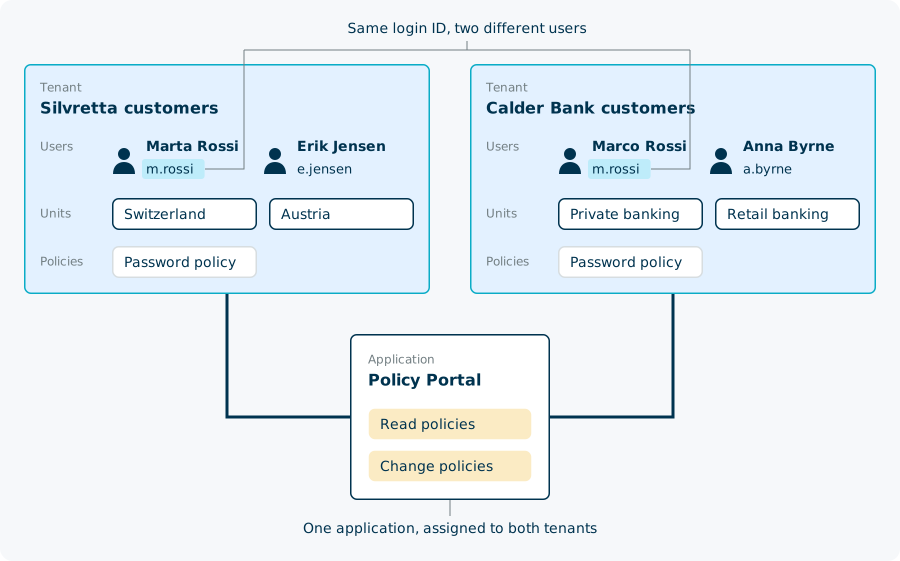
| Users, with their credentials and profiles | One tenant. The login ID of a user is unique within its tenant, so the same login ID can exist in two tenants, as two different users. |
| Units | One tenant |
| Authorizations | One tenant, through the profile |
| Enterprise roles | One tenant |
| Policies | One tenant |
| Templates | One tenant |
| Applications and their roles | Shared. An application is assigned to one or more tenants. |
A login flow works with one tenant. The flow either has a fixed tenant, or asks the user for it.
Which tenants does an instance have from the start?
| Tenant | Holds |
|---|---|
| Default | The end users who register and log in through your applications |
| API | The technical users that call the Nevis ID APIs |
| Admin | The administrators and support staff who manage the instance |
These three tenants separate kinds of users. For more information, see Data model.
When do you use a separate tenant, and when units?
Ask one question: is a person who belongs to both populations one user, with one login?
| Units in one tenant | Separate tenants | |
|---|---|---|
| A person in both populations | One user, with a profile in each unit | Two users |
| Login IDs | Unique across all units | The same login ID can exist in both |
| Policies and templates | Those of the tenant, with some settings for a unit | Each tenant has its own |
| Enterprise roles | Available in all units | Each tenant has its own |
| Administration | Kept apart by unit | Kept apart by tenant |
Silvretta Insurance makes this choice four times:
| Population | Choice | Reason |
|---|---|---|
| Motor Claims and Property Claims | Units | The same employees work in both teams |
| Garage Keller AG, a partner company | A unit | Its people use the same applications, and Motor Claims manages them |
| Arlberg Life, an acquired company | A second unit tree in the same tenant | Employees move between the companies and keep one login |
| The customers of Calder Bank | A separate tenant | The customers of the bank are not Silvretta customers. They have their own login IDs, policies, and templates. |
For more information on units, see Units and the organizational hierarchy.

What happens when you create or delete a tenant?
A new tenant is ready to hold users. Nevis ID gives it a default unit, default templates, and a default profile policy, and assigns the default application to it.
Deleting a tenant deletes everything that belongs to it: its users, credentials, units, enterprise roles, and policies.
Tenant facts at a glance
| Fact | Value |
|---|---|
| Tenants per instance from the start | Three: Default, API, Admin |
| Tenants inside a tenant | None. Structure inside a tenant is built with units. |
| Tenants per user | Exactly one |
| Tenants per unit | Exactly one |
| Tenants per enterprise role | Exactly one |
| Tenants per application | One or more |
| Login IDs | Unique within a tenant |
| Name of a tenant in the data model and the APIs | Client, written Nevis Client on this page |
Related content
- Units and the organizational hierarchy: the structure inside a tenant
- Users, profiles, and credentials: the users that belong to a tenant
- Applications, roles, and enterprise roles: applications that serve several tenants
- Delegated administration: administrators and the tenants they can reach
- B2B organization structures: partner companies as units, and when one needs a tenant of its own
- Multi-tenancy and Delegated Administration: the capability at a glance
- Deployment, Architecture, and Data Residency: the dedicated instance and its environments
- Create a client in the API reference, and Data model: the tenants of an instance