Applications, roles, and enterprise roles
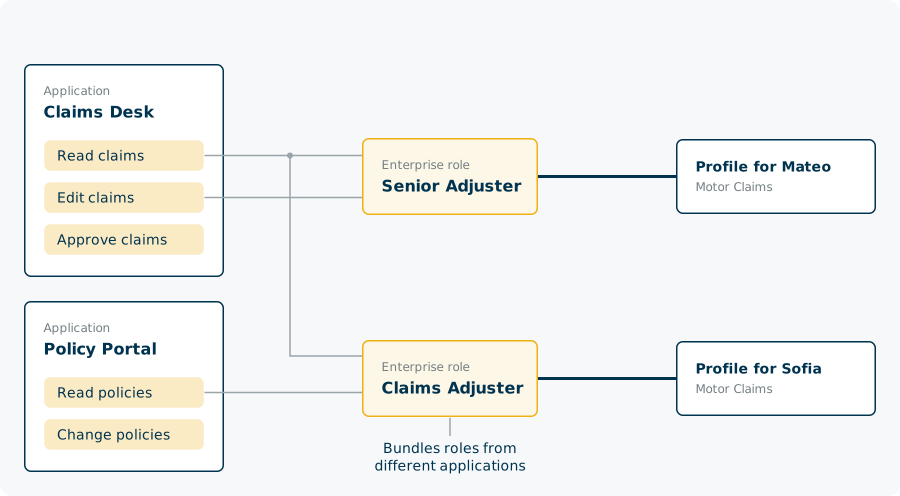
In Nevis ID, an application is the object that owns roles, and each role belongs to exactly one application. An authorization assigns one role to one profile. An enterprise role bundles roles of several applications, so you assign them in one step and change them in one place. Nevis ID assigns the roles and delivers them at login, and your application decides what each role allows.
The industry also calls this model role-based access control, with roles per application and cross-application roles.
This page uses the fictional company Silvretta Insurance, which runs two applications: Claims Desk and Policy Portal.
What is an application in Nevis ID?
An application represents one of your systems. Its purpose in Nevis ID is to own roles.
| Application | Roles |
|---|---|
| Claims Desk | Read claims, Edit claims, Approve claims |
| Policy Portal | Read policies, Change policies |
An application is assigned to the tenants (Nevis Clients) whose users work with it. One application can serve several tenants. For more information on tenants, see Tenants and isolation.
Nevis ID itself is also an application. Its roles are the administrator roles.
How does an application differ from an OIDC client?
The application says which roles exist. The OpenID Connect (OIDC) client, or the Security Assertion Markup Language (SAML) service provider, says how a user reaches the system.
They are separate objects, and neither needs the other.
| System | Application in Nevis ID | OIDC client in Nevis ID |
|---|---|---|
| An SAP system whose users log in elsewhere | Yes, with one role for each SAP role | No |
| A customer portal that only needs to know who the user is | No | Yes |
| Claims Desk | Yes | Yes |
For the SAP system, you assign the roles in Nevis ID, and a provisioning tool transfers the assignments to SAP. For the customer portal, login runs through Nevis ID, and the portal has no roles of its own. For more information on OIDC clients, see Federation and SSO.

What is a role?
A role belongs to exactly one application. Two applications can each have a role with the same name, and they are two different roles.
| Kind of role | Belongs to | What it allows |
|---|---|---|
| Application role | One of your applications | Whatever your application decides |
| Administrator role | Nevis ID itself | Managing users, profiles, units, and other objects in Nevis ID |
For more information on administrator roles, see Delegated administration.
How does a profile get a role?
An authorization assigns one role to one profile. It can have a validity period, and outside that period the role is not in force. For an administrator role, the authorization also names where the role applies.
An authorization comes from one of these sources:
- An administrator assigns the role.
- Another system assigns the role over the REST API, for example during provisioning.
- The login flow adds or removes a role.
- The tenant gives default authorizations to every new profile.
An administrator can be limited to a catalog of roles: certain applications and certain enterprise roles. For more information, see Delegated administration.
Each profile holds its roles on its own. The same role on two profiles of one user is two authorizations, and removing one leaves the other. For more information on profiles, see Users, profiles, and credentials.

What is an enterprise role?
An enterprise role is a named bundle of application roles in one tenant. Its members can come from several applications.
| Enterprise role | Members |
|---|---|
| Claims Adjuster | Read claims (Claims Desk), Read policies (Policy Portal) |
| Senior Adjuster | Read claims, Edit claims (both Claims Desk) |
An enterprise authorization assigns one enterprise role to one profile, and the profile then has every member role. Like an authorization, it can have a validity period. A profile can have several enterprise authorizations, and authorizations for single roles beside them.
Three properties define the bundle:
- The members are application roles. An administrator role cannot be a member, so an enterprise role never gives administration.
- The bundle has one level. Its members are roles, not other enterprise roles.
- The bundle is not copied to the profile. Nevis ID works out the roles from the current members.
How does an enterprise role behave when things change?
Sofia is a new claims adjuster in Motor Claims.
| Step | Roles of Sofia afterward |
|---|---|
| The enterprise role Claims Adjuster is added to Sofia's Motor Claims profile | Read claims, Read policies |
| The role Change Policies is added to the enterprise role Claims Adjuster | Read claims, Read policies, Change policies |
| The role Change Policies is removed from Claims Adjuster | Read claims, Read policies |
| The role Read Claims is added directly to Sofia's Motor Claims profile | Read claims, Read policies |
| The enterprise role Senior Adjuster is added to Sofia's Motor Claims profile | Read claims, Edit claims, Read policies |
| The enterprise role Claims Adjuster is removed from the profile | Read claims, Edit claims |
- A change to an enterprise role reaches every profile that holds it, at the next login of each person. You do not update the profiles.
- A role that reaches a profile by several paths counts once, and it stays while one path remains. Removing an enterprise role from a profile therefore does not always remove each of its roles.
How do you give many people the same access?
Roles and enterprise roles are defined once and are available in the whole tenant.
To give a group of people the same access, define one enterprise role for their job and assign it to their profiles. Silvretta Insurance has one enterprise role for claims adjusters, whichever team they work in.
You do not need a separate role for each team. An adjuster in Motor Claims and an adjuster in Property Claims hold the same role, Edit claims. At login, Claims Desk learns two things about each of them: the role, and the unit of their profile. Claims Desk can then let the first adjuster edit motor claims and the second adjuster edit property claims. For more information on units, see Units and the organizational hierarchy.
How do roles reach your systems?
| Way | When | Suits |
|---|---|---|
| In the token | At login | The application that the user logs in to |
| REST query | When the application asks | An application that needs the roles of a user outside a login |
| SCIM query | When a provisioning tool asks | A system that keeps its own copy of users and roles, such as SAP |
| Event | When an assignment changes | A system that has to follow changes without asking |
For more information on the REST and SCIM interfaces, see Integration, APIs, and Provisioning.
At login, the token carries the roles of the active profile. It can also carry roles of other applications that the profile holds.
In the token, a role that comes through an enterprise role arrives like a single role. The application sees the role and not the enterprise role, so your application depends on roles only, and you can change the bundles freely.
| Who | Decides |
|---|---|
| Nevis ID | Which roles a profile has, and whether a role is required before a request reaches the application |
| Your application | What a role allows inside the application |
For more information on requiring a role, see Authorization Policy in the patterns reference.

What happens when you delete a role, an application, or an enterprise role?
| Action | What goes with it |
|---|---|
| You delete a role | Every authorization for the role, and its place in every enterprise role |
| You delete an application | Its roles, and every authorization for those roles |
| You delete an enterprise role | Its assignment to every profile |
| You unassign an application from a tenant | Its roles on every profile of that tenant, single or through an enterprise role |
Nevis ID carries out these actions even when profiles hold the roles. A unit behaves differently: you can delete a unit only when it is empty.
Application and role facts at a glance
| Fact | Value |
|---|---|
| Applications per role | Exactly one |
| Tenants per application | One or more |
| Tenants per enterprise role | Exactly one |
| Roles per authorization | Exactly one |
| Authorization assigned to | A profile, never a user |
| Members of an enterprise role | Application roles, from one or more applications |
| Levels of bundling | One |
| Enterprise roles per enterprise authorization | Exactly one |
| Enterprise authorizations per profile | Any number, beside authorizations for single roles |
| Validity period | Optional on an authorization and on an enterprise authorization |
| Roles and units | Roles are defined for the tenant, not for a unit |
Related content
- Users, profiles, and credentials: the profiles that authorizations are assigned to
- Units and the organizational hierarchy: where a person belongs
- Tenants and isolation: the tenants (Nevis Clients) that an application is assigned to
- Delegated administration: administrator roles and their scope (Nevis Dataroom)
- B2B organization structures: the roles and enterprise roles of the people of a partner company
- B2B and Organization Management: enterprise roles for partner companies
- Application and role APIs: Create an application, Create a role for an application, Create a new authorization, Create an enterprise role, Assign a role to an enterprise role, and Create an enterprise authorization
- Data model: the Main application that every instance has from the start