ACME support for certificate management
Introduction
ACME is a protocol that automates certificate issuence, renewal and revocation. It was originally developed for Let’s encrypt but is now supported by various CA’s.
How the ACME protocol works:[https://letsencrypt.org/how-it-works/))
There exists a deprecated ACMEv1 and a recommended ACMEv2 version which is based on https://datatracker.ietf.org/doc/html/rfc8555/. This is the version supported.
The tool for managing/renewing certificates is ‘certbot’ which comes with the nevisAppliance. Certbot client consists of 2 parts:
- certbot
- certbot server plugin (likely python3-certbot-apache for nevisproxy)
Certbot has 2 different kind of plugins that use one of several ACME protocol challenges to prove one does control a domain:
Authenticators
These plugins can automatically perform the required steps to prove that you control the domain names you’re trying to request a certificate for. An authenticator is always required to obtain a certificate.
Installers
These plugins can automatically modify your web server’s configuration to serve your website over HTTPS, using the certificates obtained by Certbot. An installer is only required if you want Certbot to install the certificate to your web server.
Available plugins are described here: User Guide — Certbot 5.1.0 documentation (there are also 3rd party plugins for haproxy and others)
The tasks of certbot are:
-
Obtaining a certificate: automatically performing the required authentication steps to prove that you control the domain(s), saving the certificate to /etc/letsencrypt/live/ and renewing it on a regular schedule.
-
Optionally, installing that certificate to supported web servers (like Apache or nginx) and other kinds of servers. This is done by automatically modifying the configuration of your server in order to use the certificate.
The client can support different challenge types:
- HTTP-01 (does not work if port 80 is ‘used/blocked'
- DNS-01 (capable to issue ‘wildcard certificates’)
ATTENTION/CAVEATs
- By using certbot with HTTP challenge, nothing must be bound/listening to port 80 on the specific machine as certbot does bind/use that port for interaction(http challenges) with the CA.
- In rare cases the widely used HTTP challenge cannot be used, thus there’s a second type, the ACME DNS challenge that might be an option.
- For wildcard certificates, only the DNS challenge can be used.
These are the key steps to automate certificates with ACME:
- Select and configure ACME client
- Choose CA
- Generate key auth pair
- Generate CSR and send to CA
- Issue certificate
- Install certificate
- Automate cert renewal
How to integrate ACME on the nevisAppliance:
- Using nevisAdmin4 and patterns (recommended way) Add a new key store pattern to the frontend of a nevisProxy Virtual Host (this is the customer facing certificate for the website)
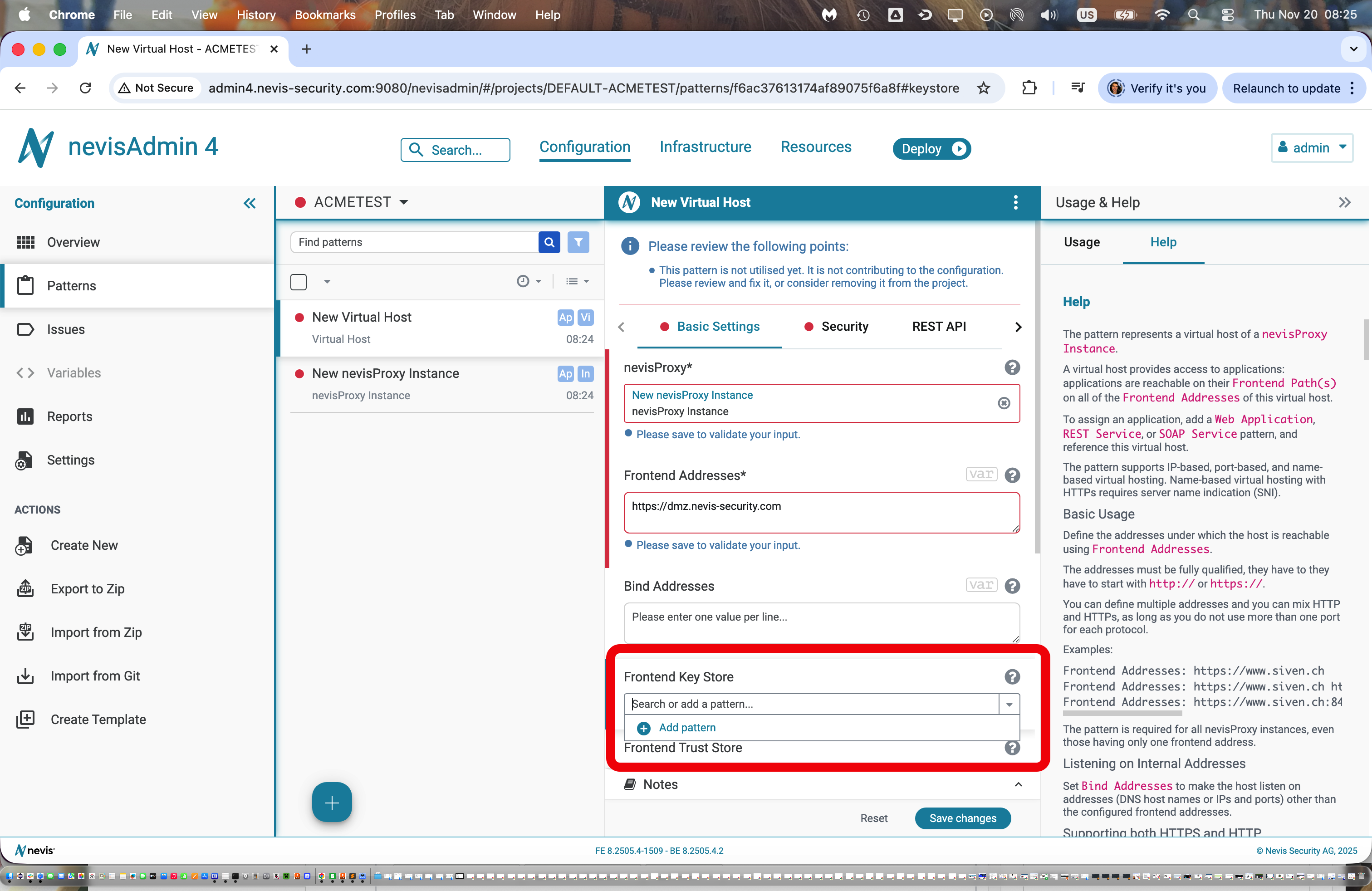
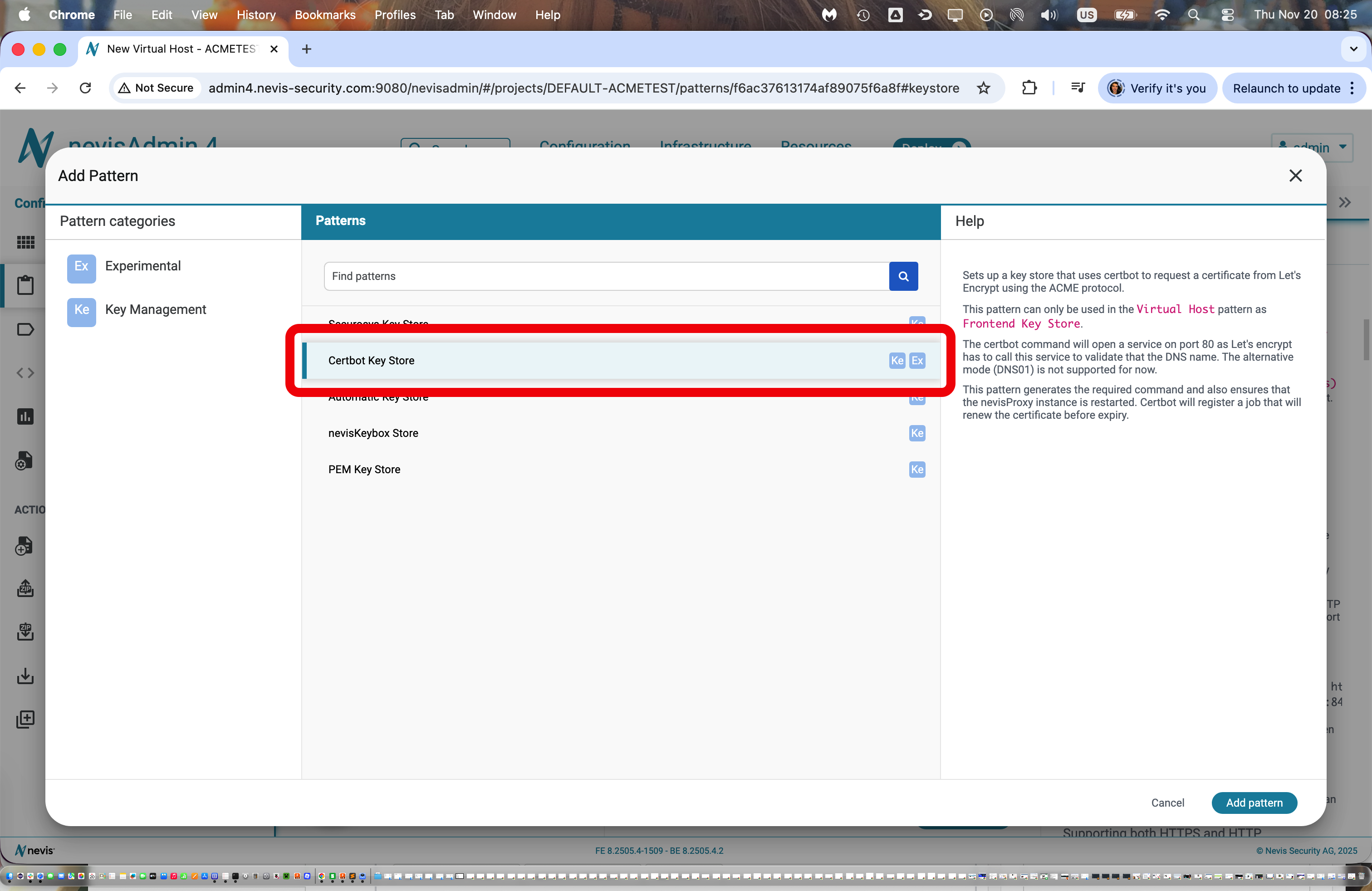
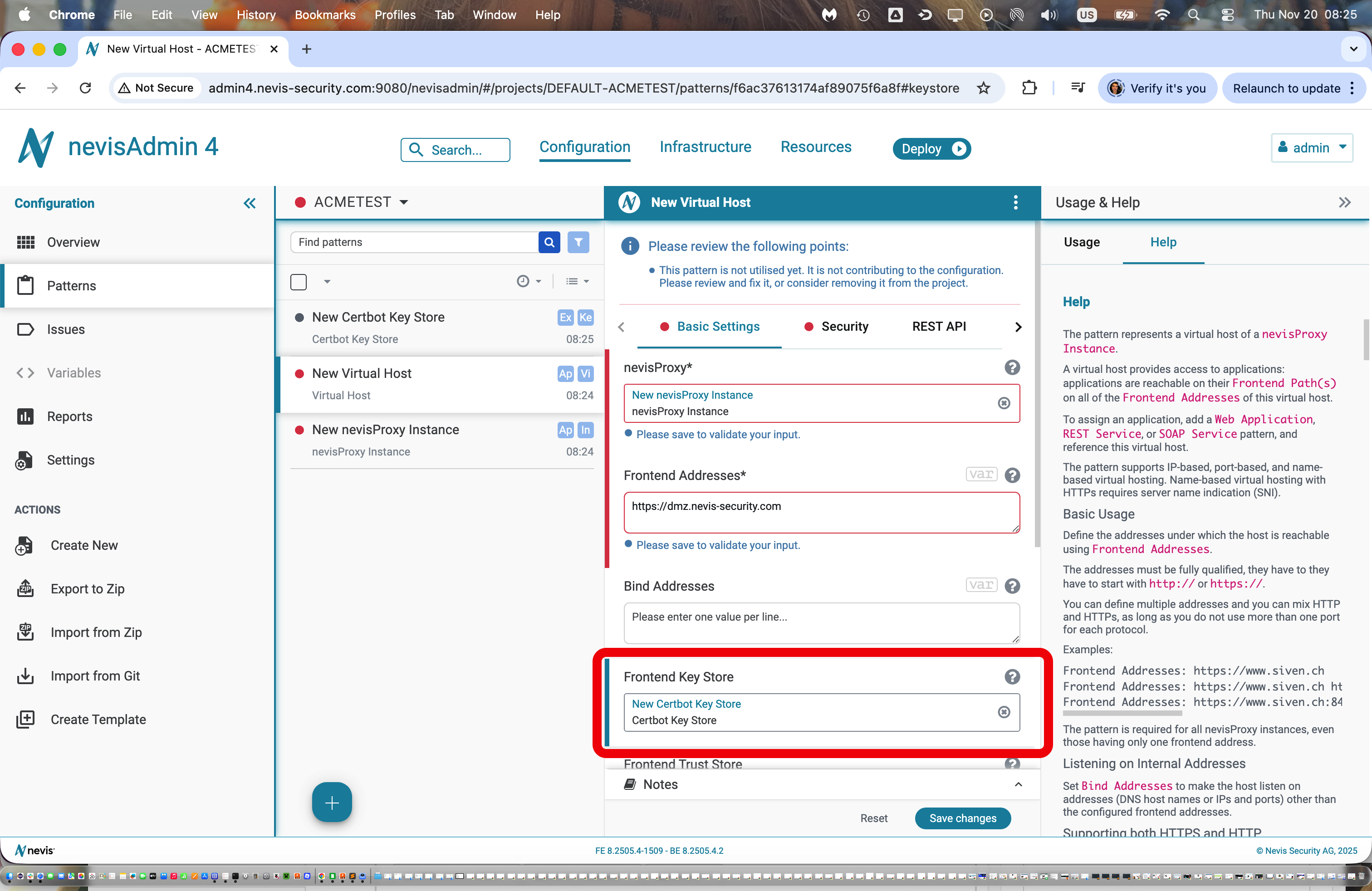
The 'Certbot Key Store' activates/initiates ACME for this key/certificate pair
The certificate is based on the 'Frontend Addresses'/name configured above
During deployment in nevisAdmin4, the preview screen shows the certbot command that will be executed on the destination host
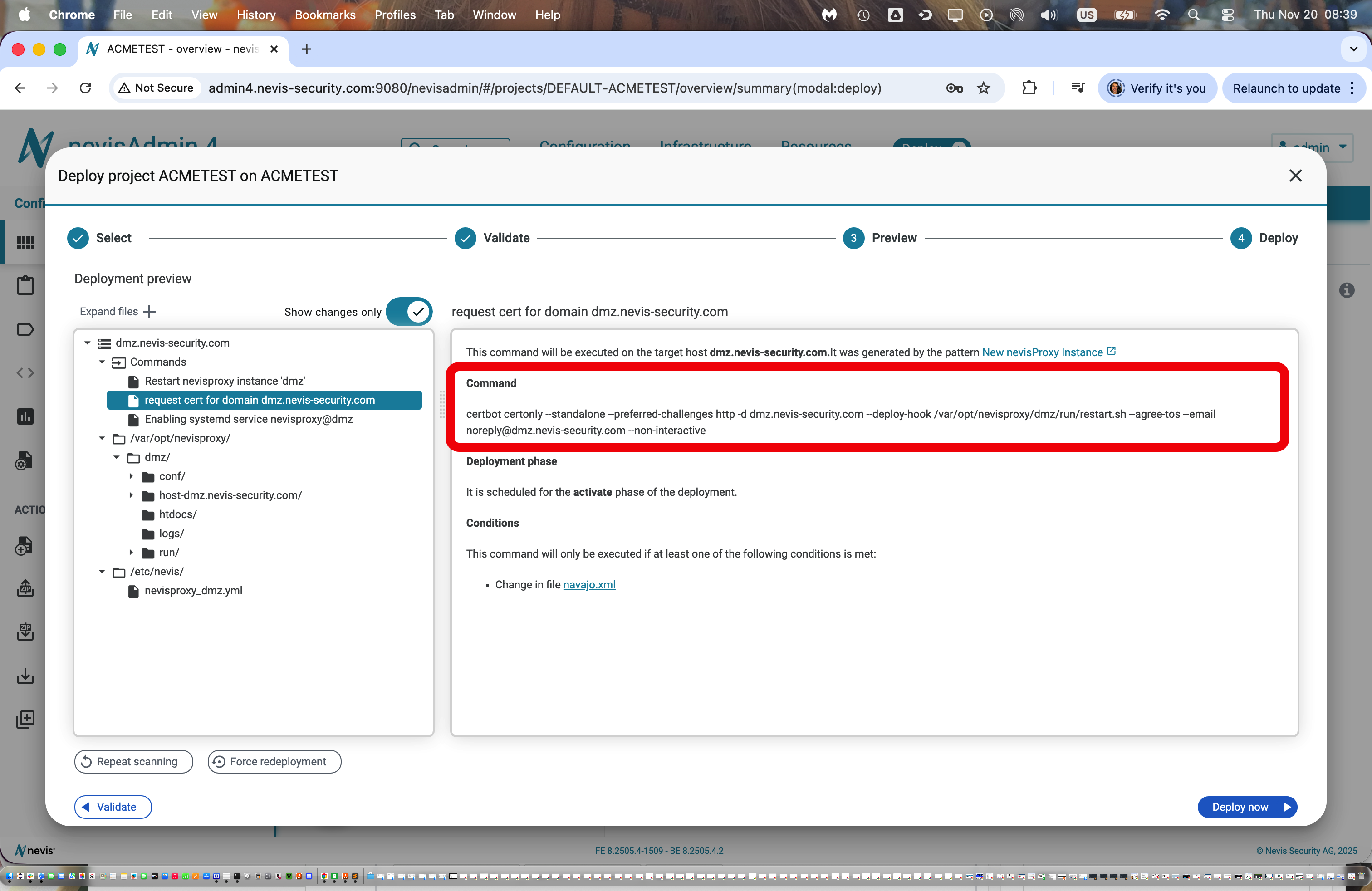
The scripts that are generated by the pattern and run on the target machine take care of placing the key material in the proper location where it is picked up by the nevis component (e.g. nevisproxy configuration)
-
Shell based on the nevisAppliance Here’s a quick wrap up using certbot for requesting a new certificate
root@appliance:/tmp# certbot certonly --standalone --preferred-challenges http -d nevis.net,www.nevis.netSaving debug log to /var/log/letsencrypt/letsencrypt.logEnter email address (used for urgent renewal and security notices)(Enter 'c' to cancel): [email protected]- - - - - - - - - - - - - - - - - - - - - - - - - - - - - - - - - - - - - - - -Please read the Terms of Service athttps://letsencrypt.org/documents/LE-SA-v1.5-February-24-2025.pdf. You mustagree in order to register with the ACME server. Do you agree?- - - - - - - - - - - - - - - - - - - - - - - - - - - - - - - - - - - - - - - -(Y)es/(N)o: y- - - - - - - - - - - - - - - - - - - - - - - - - - - - - - - - - - - - - - - -Would you be willing, once your first certificate is successfully issued, toshare your email address with the Electronic Frontier Foundation, a foundingpartner of the Let's Encrypt project and the non-profit organization thatdevelops Certbot? We'd like to send you email about our work encrypting the web,EFF news, campaigns, and ways to support digital freedom.- - - - - - - - - - - - - - - - - - - - - - - - - - - - - - - - - - - - - - - -(Y)es/(N)o: yAccount registered.Requesting a certificate for nevis.net and www.nevis.netSuccessfully received certificate.Certificate is saved at: /etc/letsencrypt/live/nevis.net/fullchain.pemKey is saved at: /etc/letsencrypt/live/nevis.net/privkey.pemThis certificate expires on 2026-02-04.These files will be updated when the certificate renews.Certbot has set up a scheduled task to automatically renew this certificate in the background.- - - - - - - - - - - - - - - - - - - - - - - - - - - - - - - - - - - - - - - -If you like Certbot, please consider supporting our work by:* Donating to ISRG / Let's Encrypt: https://letsencrypt.org/donate* Donating to EFF: https://eff.org/donate-le- - - - - - - - - - - - - - - - - - - - - - - - - - - - - - - - - - - - - - - -Certbot has now installed a service on the nevisAppliance that checks the expiration of this certificate. You can see the service here:
root@appliance:/tmp# systemctl list-timersNEXT LEFT LAST PASSED UNIT ACTIVATESThu 2025-11-06 06:39:00 GMT 9min left Thu 2025-11-06 06:09:03 GMT 20min ago phpsessionclean.timer phpsessionclean.serviceThu 2025-11-06 07:32:27 GMT 1h 2min left Wed 2025-11-05 07:32:27 GMT 22h ago systemd-tmpfiles-clean.timer systemd-tmpfiles-clean.serviceThu 2025-11-06 14:48:37 GMT 8h left Wed 2025-11-05 19:48:25 GMT 10h ago apt-daily.timer apt-daily.serviceThu 2025-11-06 18:53:38 GMT 12h left - - certbot.timer certbot.service <===================Fri 2025-11-07 00:00:00 GMT 17h left Thu 2025-11-06 00:00:02 GMT 6h ago dpkg-db-backup.timer dpkg-db-backup.serviceFri 2025-11-07 00:00:00 GMT 17h left Thu 2025-11-06 00:00:02 GMT 6h ago logrotate.timer logrotate.serviceFri 2025-11-07 03:11:30 GMT 20h left Thu 2025-11-06 01:00:53 GMT 5h 28min ago man-db.timer man-db.serviceFri 2025-11-07 06:38:39 GMT 24h left Thu 2025-11-06 06:04:20 GMT 25min ago apt-daily-upgrade.timer apt-daily-upgrade.serviceSun 2025-11-09 03:10:59 GMT 2 days left Sun 2025-11-02 03:10:41 GMT 4 days ago e2scrub_all.timer e2scrub_all.serviceMon 2025-11-10 00:08:10 GMT 3 days left Mon 2025-11-03 01:14:39 GMT 3 days ago fstrim.timer fstrim.service10 timers listed.Pass --all to see loaded but inactive timers, too.root@appliance:/tmp# systemctl status certbot.service○ certbot.service - CertbotLoaded: loaded (/lib/systemd/system/certbot.service; static)Active: inactive (dead)TriggeredBy: ● certbot.timerDocs: file:///usr/share/doc/python-certbot-doc/html/index.htmlhttps://certbot.eff.org/docsroot@appliance:/tmp# systemctl status certbot.timer● certbot.timer - Run certbot twice dailyLoaded: loaded (/lib/systemd/system/certbot.timer; enabled; preset: enabled)Active: active (waiting) since Thu 2025-11-06 06:06:15 GMT; 34min agoTrigger: Thu 2025-11-06 18:53:38 GMT; 12h leftTriggers: ● certbot.serviceNov 06 06:06:15 appliance systemd[1]: Started certbot.timer - Run certbot twice daily.root@appliance:/tmp# cat /lib/systemd/system/certbot.service[Unit]Description=CertbotDocumentation=file:///usr/share/doc/python-certbot-doc/html/index.htmlDocumentation=https://certbot.eff.org/docs[Service]Type=oneshotExecStart=/usr/bin/certbot -q renew --no-random-sleep-on-renewPrivateTmp=trueThe key material is stored in a reboot-resistant area on the nevisAppliance:
root@appliance:/tmp# ls -l /etc/letsencrypt/livetotal 8drwxr-xr-x 2 root root 4096 Nov 6 06:24 nevis.net-rw-r--r-- 1 root root 740 Nov 6 06:24 READMEroot@appliance:/tmp# ls -l /etc/letsencrypt/live/nevis.net/total 4lrwxrwxrwx 1 root root 35 Nov 6 06:24 cert.pem -> ../../archive/nevis.net/cert1.pemlrwxrwxrwx 1 root root 36 Nov 6 06:24 chain.pem -> ../../archive/nevis.net/chain1.pemlrwxrwxrwx 1 root root 40 Nov 6 06:24 fullchain.pem -> ../../archive/nevis.net/fullchain1.pemlrwxrwxrwx 1 root root 38 Nov 6 06:24 privkey.pem -> ../../archive/nevis.net/privkey1.pem-rw-r--r-- 1 root root 692 Nov 6 06:24 READMEroot@appliance:/tmp# ls -l /etc/letsencrypt/live/nevis.net/../../archive/nevis.net/total 16-rw-r--r-- 1 root root 1302 Nov 6 06:24 cert1.pem-rw-r--r-- 1 root root 1566 Nov 6 06:24 chain1.pem-rw-r--r-- 1 root root 2868 Nov 6 06:24 fullchain1.pem-rw------- 1 root root 241 Nov 6 06:24 privkey1.pemroot@appliance:/etc/httpd# cat /etc/cron.d/certbot# /etc/cron.d/certbot: crontab entries for the certbot package## Upstream recommends attempting renewal twice a day## Eventually, this will be an opportunity to validate certificates# haven't been revoked, etc. Renewal will only occur if expiration# is within 30 days.## Important Note! This cronjob will NOT be executed if you are# running systemd as your init system. If you are running systemd,# the cronjob.timer function takes precedence over this cronjob. For# more details, see the systemd.timer manpage, or use systemctl show# certbot.timer.SHELL=/bin/shPATH=/usr/local/sbin:/usr/local/bin:/sbin:/bin:/usr/sbin:/usr/bin0 */12 * * * root test -x /usr/bin/certbot -a \! -d /run/systemd/system && perl -e 'sleep int(rand(43200))' && certbot -q renew --no-random-sleep-on-renewFor testing purposes, a certificate renewal can be simulated using the 'dryrun' argument with certbot:
root@appliance:/etc/httpd# certbot renew --dry-runSaving debug log to /var/log/letsencrypt/letsencrypt.log- - - - - - - - - - - - - - - - - - - - - - - - - - - - - - - - - - - - - - - -Processing /etc/letsencrypt/renewal/nevis.net.conf- - - - - - - - - - - - - - - - - - - - - - - - - - - - - - - - - - - - - - - -Account registered.Simulating renewal of an existing certificate for nevis.net and www.nevis.net- - - - - - - - - - - - - - - - - - - - - - - - - - - - - - - - - - - - - - - -Congratulations, all simulated renewals succeeded:/etc/letsencrypt/live/nevis.net/fullchain.pem (success)- - - - - - - - - - - - - - - - - - - - - - - - - - - - - - - - - - - - - - - -root@appliance:/etc/httpd# openssl x509 -text -in /etc/letsencrypt/live/nevis.net/fullchain.pemCertificate:Data:Version: 3 (0x2)Serial Number:05:98:ae:6c:ae:c9:67:ea:f3:8e:11:41:a4:fb:7f:c0:60:42Signature Algorithm: ecdsa-with-SHA384Issuer: C = US, O = Let's Encrypt, CN = E7ValidityNot Before: Nov 6 05:26:23 2025 GMTNot After : Feb 4 05:26:22 2026 GMTSubject: CN = nevis.netSubject Public Key Info:Public Key Algorithm: id-ecPublicKeyPublic-Key: (256 bit)pub:04:2e:6a:34:8a:d0:12:e1:22:43:51:c7:6c:61:2f:e8:7a:ac:...ASN1 OID: prime256v1NIST CURVE: P-256X509v3 extensions:X509v3 Key Usage: criticalDigital SignatureX509v3 Extended Key Usage:TLS Web Server Authentication, TLS Web Client AuthenticationX509v3 Basic Constraints: criticalCA:FALSEX509v3 Subject Key Identifier:F2:1B:53:A1:25:41:41:40:DB:1F:96:5B:4C:C3:99:44:A2:AF:BF:EAX509v3 Authority Key Identifier:AE:48:9E:DC:87:1D:44:A0:6F:DA:A2:E5:60:74:04:78:C2:9C:00:80Authority Information Access:CA Issuers - URI:http://e7.i.lencr.org/X509v3 Subject Alternative Name:DNS:nevis.net, DNS:www.nevis.netX509v3 Certificate Policies:Policy: 2.23.140.1.2.1X509v3 CRL Distribution Points:Full Name:URI:http://e7.c.lencr.org/67.crlCT Precertificate SCTs:Signed Certificate Timestamp:Version : v1 (0x0)Log ID : 49:9C:9B:...Timestamp : Nov 6 06:24:53.989 2025 GMTExtensions: noneSignature : ecdsa-with-SHA25630:45:02:21:00:...Signed Certificate Timestamp:Version : v1 (0x0)Log ID : 96:97:64:...Timestamp : Nov 6 06:24:54.048 2025 GMTExtensions: noneSignature : ecdsa-with-SHA25630:44:02:20:...Signature Algorithm: ecdsa-with-SHA384Signature Value:30:66:02:31:...-----BEGIN CERTIFICATE-----MIIDlDCCAxmgAwIBAgISBZiubK7JZ...-----END CERTIFICATE-----Certificates on the respective nevisAppliance that are under control of certbot can be listed with this command:
root@appliance:/tmp# certbot certificates --standaloneSaving debug log to /var/log/letsencrypt/letsencrypt.log- - - - - - - - - - - - - - - - - - - - - - - - - - - - - - - - - - - - - - - -Found the following certs:Certificate Name: nevis.netSerial Number: 598ae6caec967eaf38e1141a4fb7fc06042Key Type: ECDSADomains: nevis.net www.nevis.netExpiry Date: 2026-02-04 05:26:22+00:00 (VALID: 89 days)Certificate Path: /etc/letsencrypt/live/nevis.net/fullchain.pemPrivate Key Path: /etc/letsencrypt/live/nevis.net/privkey.pem- - - - - - - - - - - - - - - - - - - - - - - - - - - - - - - - - - - - - - - -