Fetch
Prerequisites
- nevisFIDO version 7.2402.0.3 or newer. Note that AuthCloud guarantees that the nevisFIDO version it uses is compatible with the fetch operation.
- Nevis Access App version 4.0.0 or newer.
How it Works
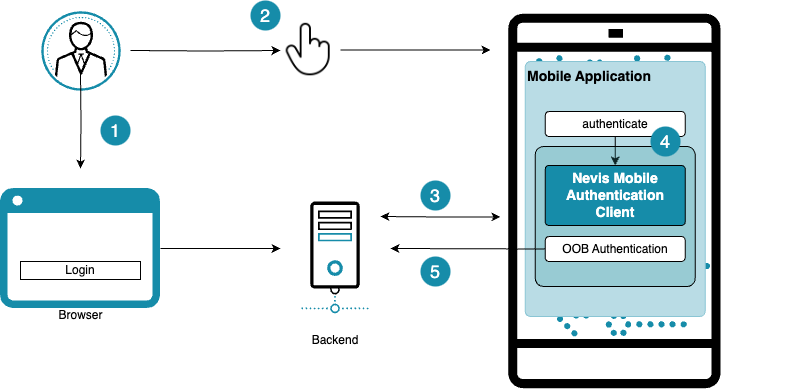
- The end user starts a login.
- When the app is opened or enters the foreground, it automatically fetches pending operations.
- The user can also tap the fetch icon on the home screen to fetch pending operations immediately.
- If any pending operations are found, the app starts the most recently invoked one right away.
- The app processes the fetched operation and completes the authentication flow.
- The user is granted access to the protected endpoint (for example, a web application in a desktop browser).
Handling multiple pending operations
The fetch channel retrieves all pending out-of-band operations for the device — that is, every operation whose token has not yet been redeemed and that has not expired — not just the latest one. The operations are ordered by their creation time, so the app starts the most recently invoked operation first.
Because all pending operations are queued rather than discarded, the fetch icon keeps its badge after a request has been fetched if one or more older, still-valid operations remain. The badge disappears only once every pending operation has been redeemed or has expired. This is intended behavior: it ensures that no valid pending request is silently dropped, so the user can work through the queued operations one after another.
When to use the fetch channel
The fetch channel complements the push, QR code, and link channels — it does not replace them. It is especially useful in the following situations:
- Missed push notification. A push notification can fail to reach the device, for example when the device was offline when the notification was sent, the push service was temporarily unavailable, or the user disabled notifications for the app. The operation still exists in the backend, so the user can retrieve it through the fetch channel instead of being blocked.
- Accessibility. A user who cannot scan a QR code or reliably follow a link, for example a visually impaired user, can still complete an operation that was dispatched through the QR code or link channel. Because the fetch channel surfaces the pending operation directly inside the app, the operation can be completed without a camera scan. For this reason the app does not restrict fetching to push operations; it also surfaces operations dispatched through the QR code and link channels.
Additional behavior details
- If there is an ongoing operation, the fetch icon is displayed with a badge (see Handling multiple pending operations for when the badge is cleared).
- The fetch feature handles operations regardless of dispatch channel, including push, QR, and link.
For conceptual background and integration guidance for developers, see Using fetch in the Mobile SDK documentation.